\n
## Diagram: PlayStation Controller Layout
### Overview
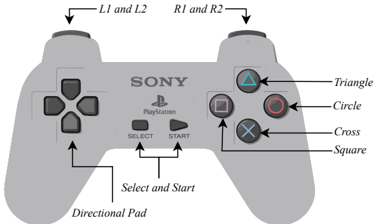
The image is a diagram illustrating the layout of a PlayStation controller. It depicts a top-down view of the controller, with labels pointing to various buttons and components. The diagram is primarily for identifying the location and names of the controller's features.
### Components/Axes
The diagram labels the following components:
* **L1 and L2**: Located on the left shoulder of the controller.
* **R1 and R2**: Located on the right shoulder of the controller.
* **Triangle**: A blue triangle-shaped button.
* **Circle**: A red circle-shaped button.
* **Cross**: A blue cross-shaped button.
* **Square**: A pink square-shaped button.
* **Directional Pad**: Located on the left side of the controller.
* **Select and Start**: Two buttons located centrally, below the PlayStation logo.
* **PlayStation Logo**: Centrally located on the controller face.
* **SONY**: Brand name located above the PlayStation logo.
### Detailed Analysis or Content Details
The diagram provides a static representation of the controller's layout. There are no numerical values or trends to analyze. The labels are directly associated with the corresponding buttons/components on the controller image.
* **Shoulder Buttons:** L1 and L2 are positioned on the upper-left, while R1 and R2 are on the upper-right.
* **Face Buttons:** The Triangle, Circle, Cross, and Square buttons are arranged in a diamond pattern on the right side of the controller.
* **Central Buttons:** The Select and Start buttons are positioned below the PlayStation logo.
* **Directional Pad:** The directional pad is located on the left side of the controller.
### Key Observations
The diagram clearly identifies all the major buttons and components of a standard PlayStation controller. The layout is symmetrical, with the shoulder buttons and face buttons mirroring each other. The PlayStation logo and brand name are prominently displayed.
### Interpretation
The diagram serves as a visual guide for understanding the physical layout of a PlayStation controller. It is useful for new users learning the controller's functions or for reference when discussing controller configurations. The diagram does not provide any information about the controller's functionality or technical specifications, only its physical arrangement. The diagram is a simple, direct representation of the controller's design, intended for easy identification of its components.