## [Comparison of Good and Bad Object Tracking Examples]: Visual Task in a Bathroom Scene
### Overview
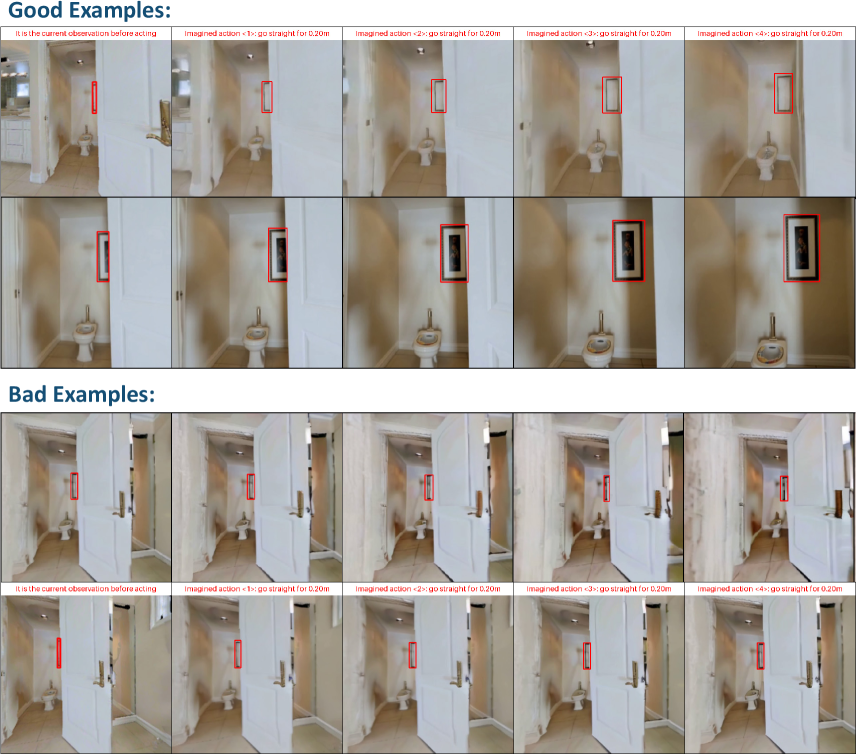
The image compares **"Good Examples"** and **"Bad Examples"** of object tracking (or detection) in a bathroom scene, using a red bounding box to highlight a target object (e.g., a mirror, framed picture, or vertical wall object). Each section (Good/Bad) contains two rows of images: the first row shows the *initial observation* and *imagined actions* (camera movement), while the second row shows the *result* of those actions.
### Components/Sections
The image is divided into two primary sections:
#### 1. Good Examples (Top Section)
- **Top Row (5 images)**:
- First image: *"It is the current observation before acting"* (bathroom with a white door, toilet, sink, and a vertical object (e.g., mirror) highlighted by a red box).
- Next four images: *"Imagined action <1> go straight for 0.20m"*, *"Imagined action <2> go straight for 0.20m"*, *"Imagined action <3> go straight for 0.20m"*, *"Imagined action <4> go straight for 0.20m"* (same bathroom scene; the red box consistently tracks the vertical object, which appears to be a mirror or framed item).
- **Bottom Row (5 images)**:
- First image: *"It is the current observation before acting"* (bathroom with the door open; the red box highlights a vertical object (now a framed picture)).
- Next four images: Same imagined actions (go straight for 0.20m); the red box tracks the framed picture, which becomes more visible (larger, clearer) as the camera moves straight.
#### 2. Bad Examples (Bottom Section)
- **Top Row (5 images)**:
- First image: *"It is the current observation before acting"* (bathroom with the door open; the red box highlights a vertical object (e.g., mirror)).
- Next four images: Same imagined actions; the red box tracks a *different object* (e.g., door handle, wall frame) instead of the intended vertical object.
- **Bottom Row (5 images)**:
- First image: *"It is the current observation before acting"* (bathroom with the door open; the red box highlights a vertical object (e.g., mirror)).
- Next four images: Same imagined actions; the red box tracks a *different object* (e.g., door frame, wall) instead of the intended vertical object.
### Detailed Analysis
#### Good Examples (Object Tracking Success)
- **Initial Observation**: The red box highlights a vertical object (e.g., mirror/framed picture) in the bathroom.
- **Imagined Actions (Go Straight for 0.20m)**:
- The red box *consistently tracks the intended object* across all actions.
- The object’s appearance changes (e.g., size, clarity) as the camera moves straight, indicating the action’s effect (e.g., the object becomes more visible/larger as the camera approaches).
#### Bad Examples (Object Tracking Failure)
- **Initial Observation**: The red box highlights a vertical object (e.g., mirror).
- **Imagined Actions (Go Straight for 0.20m)**:
- The red box *fails to track the intended object* and instead follows a different object (e.g., door handle, wall frame).
- The intended object (e.g., mirror) remains unclear or untracked, showing errors in object recognition/tracking.
### Key Observations
- **Spatial Grounding**: In *Good Examples*, the red box stays on the vertical object (center-right of the image). In *Bad Examples*, the red box shifts to a different object (e.g., left-side door handle, wall frame).
- **Trend Verification**: In *Good Examples*, the target object becomes more visible (larger, clearer) as the camera moves straight (consistent with the action’s effect). In *Bad Examples*, the target object does not become more visible, and the red box is misplaced.
- **Consistency**: *Good Examples* show consistent tracking of the intended object; *Bad Examples* show inconsistent or incorrect tracking.
### Interpretation
This image illustrates the difference between **successful** and **unsuccessful object tracking** in a simulated environment (bathroom scene) with imagined camera actions (moving straight).
- **Good Examples**: Demonstrate correct object recognition and tracking: the red box follows the intended object (mirror/framed picture) as the camera moves, and the object’s appearance changes (size, clarity) due to the action. This suggests the system correctly identifies the object’s identity and location.
- **Bad Examples**: Demonstrate errors in object recognition/tracking: the red box follows a different object (door handle, frame, etc.), failing to track the intended object. This suggests the system misidentifies the object or its location.
The task likely involves predicting how an object’s appearance changes with camera movement (action) and tracking it correctly. The “good” examples reflect a correct understanding of the object’s identity and spatial relationship to the camera, while “bad” examples reflect errors in this understanding.
(Note: All text is in English; no other languages are present.)