TECHNICAL ASSET FINGERPRINT
239a1e830d8e0b44a2563480
Click to view fullscreen
Press ESC or click to close
FOUND IN PAPERS
EXPERT: healer-alpha-free VERSION 1
RUNTIME: free/openrouter/healer-alpha
INTEL_VERIFIED
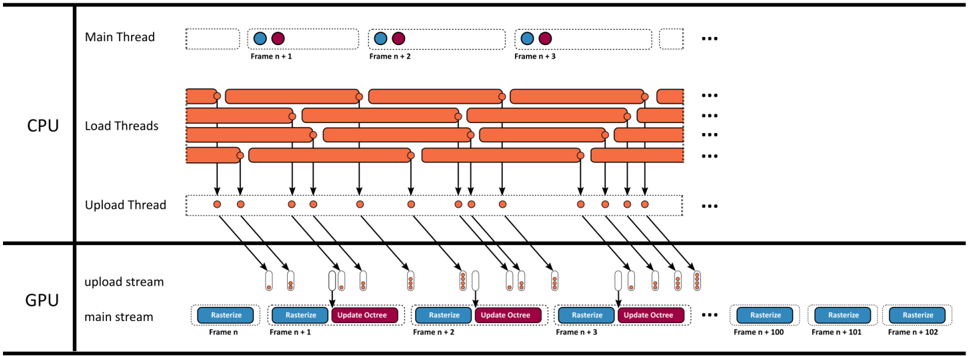
## Diagram: Multi-Threaded CPU-GPU Rendering Pipeline
### Overview
This image is a technical diagram illustrating a multi-threaded rendering pipeline, showing the parallel processing and data flow between CPU and GPU threads over a sequence of frames. It visualizes how frame rendering tasks are distributed and synchronized across different hardware units.
### Components/Axes
The diagram is divided into two primary horizontal sections, separated by a thick black line:
1. **CPU Section (Top):** Contains three distinct thread types.
2. **GPU Section (Bottom):** Contains two distinct streams.
**CPU Components:**
* **Main Thread:** A single row at the top. It shows a sequence of frames labeled `Frame n+1`, `Frame n+2`, `Frame n+3`, followed by an ellipsis (`...`). Each frame is represented by a dashed box containing two colored circles: a blue circle on the left and a purple circle on the right.
* **Load Threads:** Multiple rows (approximately 5-6 visible) below the Main Thread. Each row consists of a series of long, horizontal orange bars with rounded ends, representing continuous work units. These bars are staggered and overlap across rows, indicating parallel execution. An ellipsis (`...`) appears at the end of each row.
* **Upload Thread:** A single row below the Load Threads. It consists of a dashed box containing a series of small, solid orange dots. Black arrows point downward from specific orange dots in the Load Threads to these dots in the Upload Thread. More arrows point from the Upload Thread dots down into the GPU section. An ellipsis (`...`) is at the end.
**GPU Components:**
* **upload stream:** A row receiving data from the CPU's Upload Thread. It shows small, vertical rectangular blocks (appearing as pairs of a white and an orange rectangle) that correspond to the data packets sent from the CPU.
* **main stream:** A row at the bottom showing the primary GPU work. It displays a sequence of labeled tasks for consecutive frames:
* `Frame n`: A blue box labeled `Rasterize`.
* `Frame n+1`: A blue `Rasterize` box followed by a purple `Update Octree` box.
* `Frame n+2`: A blue `Rasterize` box followed by a purple `Update Octree` box.
* `Frame n+3`: A blue `Rasterize` box followed by a purple `Update Octree` box.
* An ellipsis (`...`) follows.
* Further to the right, three standalone blue `Rasterize` boxes are shown for `Frame n+100`, `Frame n+101`, and `Frame n+102`.
### Detailed Analysis
**Data Flow & Timing:**
1. **CPU Load Phase:** The `Load Threads` show long, overlapping orange bars, indicating that multiple assets or scene components are being loaded or processed in parallel on the CPU. This work is not synchronized to a single frame's timeline.
2. **CPU Upload Phase:** Specific completion points within the `Load Threads` (represented by the end of an orange bar) trigger an upload task. This is shown by arrows pointing to a dot in the `Upload Thread`. The `Upload Thread` then serializes these tasks, sending data packets (represented by arrows) to the GPU's `upload stream`.
3. **GPU Execution Phase:** The GPU's `main stream` operates on a strict per-frame schedule. For each frame starting from `n+1`, it performs two main operations in sequence: first `Rasterize` (blue), then `Update Octree` (purple). The `Rasterize` operation for a given frame (e.g., `Frame n+1`) appears to begin before the `Update Octree` for the previous frame (`Frame n`) is complete, suggesting pipelining.
4. **Asynchronous Upload:** The data arriving in the GPU's `upload stream` is decoupled from the `main stream`. The uploads happen in bursts that do not directly align with the start of each frame's `Rasterize` task, indicating asynchronous data transfer to avoid stalling the GPU's main rendering work.
**Spatial Grounding:**
* The **legend/labels** for thread types (`Main Thread`, `Load Threads`, `Upload Thread`) are positioned on the far left of the CPU section.
* The **legend/labels** for GPU streams (`upload stream`, `main stream`) are positioned on the far left of the GPU section.
* **Frame labels** (`Frame n`, `Frame n+1`, etc.) are placed directly below their corresponding task boxes in the GPU `main stream` and inside the dashed boxes of the CPU `Main Thread`.
* **Task labels** (`Rasterize`, `Update Octree`) are embedded within their respective colored boxes (blue and purple) in the GPU `main stream`.
### Key Observations
1. **Parallelism vs. Serialization:** The CPU `Load Threads` exhibit massive parallelism (many overlapping bars), while the CPU `Upload Thread` and GPU `main stream` are serialized pipelines.
2. **Pipeline Staggering:** The GPU `main stream` shows a clear staggered pattern. The `Rasterize` task for `Frame n+1` starts while the `Update Octree` for `Frame n` is still active, demonstrating a classic graphics pipeline to maximize GPU utilization.
3. **Long-Term Consistency:** The isolated `Rasterize` boxes for frames `n+100` to `n+102` on the far right suggest this pipeline pattern continues consistently for many frames.
4. **Color-Coded Tasks:** The diagram uses color consistently: **Orange** for CPU-side work (loading, uploading), **Blue** for GPU rasterization, and **Purple** for GPU octree updates. The two circles in the CPU `Main Thread` (blue and purple) likely symbolize the CPU's coordination or dependency on these two GPU task types.
### Interpretation
This diagram depicts a sophisticated, high-performance rendering architecture designed to keep both the CPU and GPU busy by decoupling their workloads.
* **What it demonstrates:** The system separates the unpredictable, parallelizable work of asset loading (CPU `Load Threads`) from the strict, frame-locked work of rendering (GPU `main stream`). The `Upload Thread` acts as a bridge, managing the transfer of loaded data to the GPU without forcing the main render loop to wait.
* **Relationship between elements:** The CPU's `Main Thread` likely orchestrates the frame schedule, but the heavy lifting is offloaded to worker threads. The GPU is fed by two asynchronous streams: one for data (`upload stream`) and one for commands (`main stream`). This allows texture or geometry uploads to happen in the background while the GPU is busy rasterizing the current frame.
* **Notable implications:** The architecture minimizes "GPU starvation" by ensuring data is uploaded just-in-time or ahead of need. The `Update Octree` task per frame suggests a dynamically changing scene where spatial acceleration structures are rebuilt or updated each frame. The overall design prioritizes throughput and frame rate stability over minimizing the latency of a single frame, which is typical for real-time rendering engines in games or simulations. The clear separation of concerns (load, upload, rasterize, update) is a hallmark of a mature, optimized graphics pipeline.
DECODING INTELLIGENCE...