## Dependency Diagram and Formalization Status
### Overview
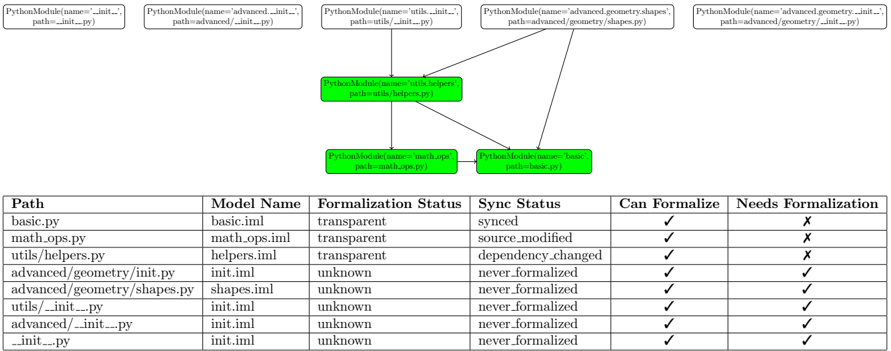
The image presents a dependency diagram of Python modules and a table detailing their formalization status. The diagram shows relationships between modules, while the table provides information on their formalization status, synchronization status, and whether they can or need formalization.
### Components/Axes
**Diagram Components:**
* **Nodes:** Represented as rounded rectangles, each labeled as "PythonModule(name='module_name', path='module_path')". The nodes are colored white except for three nodes colored green.
* **Edges:** Represented as arrows, indicating dependencies between modules.
* **Node Labels:** Each node contains the module name and its file path.
**Table Columns:**
* **Path:** File path of the Python module.
* **Model Name:** Name of the model associated with the module.
* **Formalization Status:** Status of formalization (transparent or unknown).
* **Sync Status:** Status of synchronization (synced, source\_modified, dependency\_changed, or never\_formalized).
* **Can Formalize:** Indicates whether the module can be formalized (represented by a checkmark).
* **Needs Formalization:** Indicates whether the module needs formalization (represented by a checkmark or an "X").
### Detailed Analysis
**Diagram Nodes and Connections:**
* **Top Row (White Nodes):**
* `PythonModule(name='__init__', path='__init__.py')`
* `PythonModule(name='advanced.__init__', path='advanced/__init__.py')`
* `PythonModule(name='utils.__init__', path='utils/__init__.py')`
* `PythonModule(name='advanced.geometry.shapes', path='advanced/geometry/shapes.py')`
* `PythonModule(name='advanced.geometry.__init__', path='advanced/geometry/__init__.py')`
* **Middle Row (Green Nodes):**
* `PythonModule(name='utils.helpers', path='utils/helpers.py')`
* **Bottom Row (Green Nodes):**
* `PythonModule(name='math.ops', path='math.ops.py')`
* `PythonModule(name='basic', path='basic.py')`
**Connections:**
* `utils.__init__.py` connects to `utils.helpers.py`.
* `advanced.geometry.shapes.py` connects to `utils.helpers.py` and `basic.py`.
* `utils.helpers.py` connects to `math.ops.py` and `basic.py`.
**Table Data:**
| Path | Model Name | Formalization Status | Sync Status | Can Formalize | Needs Formalization |
| :------------------------------- | :----------- | :------------------- | :----------------- | :------------ | :------------------ |
| basic.py | basic.iml | transparent | synced | ✓ | X |
| math.ops.py | math.ops.iml | transparent | source\_modified | ✓ | X |
| utils/helpers.py | helpers.iml | transparent | dependency\_changed | ✓ | X |
| advanced/geometry/\_\_init\_\_.py | init.iml | unknown | never\_formalized | ✓ | ✓ |
| advanced/geometry/shapes.py | shapes.iml | unknown | never\_formalized | ✓ | ✓ |
| utils/\_\_init\_\_.py | init.iml | unknown | never\_formalized | ✓ | ✓ |
| advanced/\_\_init\_\_.py | init.iml | unknown | never\_formalized | ✓ | ✓ |
| \_\_init\_\_.py | init.iml | unknown | never\_formalized | ✓ | ✓ |
### Key Observations
* The diagram shows a dependency structure where `utils.helpers.py` and `basic.py` are central modules, with multiple other modules depending on them.
* The table indicates that `basic.py`, `math.ops.py`, and `utils/helpers.py` have a "transparent" formalization status and do not need formalization.
* The modules in the `advanced/geometry` and `utils` directories, along with the root `__init__.py`, have an "unknown" formalization status and "never\_formalized" sync status, indicating they need formalization.
### Interpretation
The diagram and table provide insights into the formalization status of a Python project. The green nodes in the diagram likely represent modules that are already formalized or considered stable, while the white nodes represent modules that may require further attention. The table confirms this, showing that the modules with "transparent" formalization status do not need formalization, while those with "unknown" status do. The "never\_formalized" sync status suggests that these modules have not been included in the formalization process yet. The arrows indicate the direction of dependency, showing which modules rely on others. This information can be used to prioritize formalization efforts and understand the impact of changes in different modules.