\n
## Diagram: Python Module Dependency and Formalization Status
### Overview
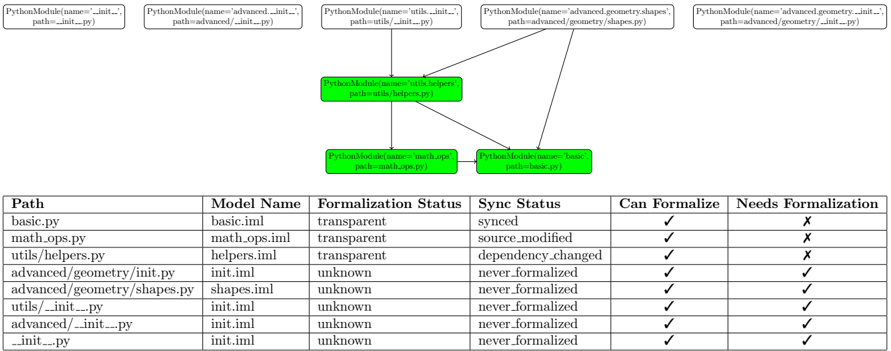
The image presents a diagram illustrating the dependency relationships between Python modules, alongside a table detailing their formalization and synchronization status. The diagram shows a tree-like structure where modules depend on others, and the table provides specific information about each module's formalization process.
### Components/Axes
The diagram consists of rectangular nodes representing Python modules, connected by arrows indicating dependencies. Each node is labeled with the module's name and path. The table below the diagram has the following columns: "Path", "Model Name", "Formalization Status", "Sync Status", "Can Formalize", and "Needs Formalization".
### Detailed Analysis or Content Details
**Diagram Analysis:**
* **Root Module:** `PythonModule(name='utils.helpers', path='utils/helpers.py')` is at the center of the diagram.
* **Parent Modules:** This root module is dependent on `PythonModule(name='math.ops', path='math.ops.py')` and `PythonModule(name='basic', path='basic.py')`.
* **Further Dependencies:** `PythonModule(name='__init__', path='__init__.py')` appears multiple times as a dependency for other modules: `advanced/__init__.py`, `utils/__init__.py`, and `advanced/geometry/__init__.py`.
* **Module Paths:** The paths indicate a directory structure: `utils`, `advanced`, and `advanced/geometry`.
**Table Analysis:**
| Path | Model Name | Formalization Status | Sync Status | Can Formalize | Needs Formalization |
| :--------------------- | :------------ | :------------------- | :------------------- | :------------ | :------------------ |
| basic.py | basic.iml | transparent | synced | ✅ | ❌ |
| math.ops.py | math.ops.iml | transparent | source\_modified | ✅ | ❌ |
| utils/helpers.py | helpers.iml | transparent | dependency\_changed | ✅ | ❌ |
| advanced/geometry/init.py | init.iml | unknown | never formalized | ✅ | ✅ |
| advanced/geometry/shapes.py | shapes.iml | unknown | never formalized | ✅ | ✅ |
| utils/\_\_init\_\_.py | init.iml | unknown | never formalized | ✅ | ✅ |
| advanced/\_\_init\_\_.py | init.iml | unknown | never formalized | ✅ | ✅ |
| \_\_init\_\_.py | init.iml | unknown | never formalized | ✅ | ✅ |
* **Formalization Status:** The status can be "transparent", "unknown".
* **Sync Status:** The status can be "synced", "source\_modified", "dependency\_changed", or "never formalized".
* **Can Formalize:** All modules have a checkmark (✅) in this column.
* **Needs Formalization:** Modules with "unknown" formalization status all have a checkmark (✅) in this column, indicating they require formalization. Modules with "transparent" status have an 'X' (❌).
### Key Observations
* Modules with "transparent" formalization status are synchronized, but some have either source modifications or dependency changes.
* Modules within the `advanced` and `utils` directories, particularly the `__init__.py` files, have an "unknown" formalization status and "never formalized" sync status, indicating they require attention.
* All modules *can* be formalized, but only those with "unknown" status *need* to be.
### Interpretation
The diagram and table together provide a snapshot of the formalization process for a set of Python modules. The diagram visually represents the dependencies between these modules, while the table provides detailed information about their formalization and synchronization status. The data suggests that while some modules are fully synchronized and formalized ("transparent" status), others, particularly those in the `advanced` and `utils` directories, are lagging behind and require formalization. The "Can Formalize" and "Needs Formalization" columns clearly highlight which modules require immediate attention. The sync statuses "source\_modified" and "dependency\_changed" suggest that even the "transparent" modules may require review to ensure consistency with their dependencies and source code. This information is crucial for maintaining a well-organized and reliable codebase.