## Diagram: Merged Dependencies of Python Modules
### Overview
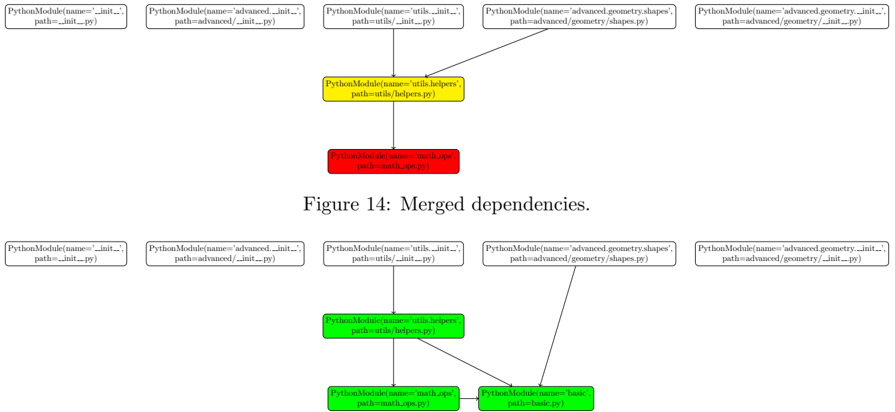
The image is a diagram illustrating the merged dependencies between various Python modules. The diagram consists of rectangular nodes representing Python modules, with arrows indicating dependencies between them. The nodes are colored differently to highlight specific relationships or categories. The diagram is split into two similar structures, one above the other.
### Components/Axes
* **Nodes:** Represent Python modules. Each node contains the module's name and path.
* Format: `PythonModule(name='module_name', path='module/path.py')`
* **Arrows:** Indicate dependencies. An arrow from Module A to Module B means Module A depends on Module B.
* **Colors:**
* White: Initial modules.
* Yellow: `utils.helpers` module in the top structure.
* Red: `math.ops` module in the top structure.
* Green: `utils.helpers`, `math.ops`, and `basic` modules in the bottom structure.
* **Title:** "Figure 14: Merged dependencies."
### Detailed Analysis
**Top Structure:**
* **Row 1 (Top-Left to Top-Right):**
* `PythonModule(name='__init__', path='__init__.py')` (White)
* `PythonModule(name='advanced.__init__', path='advanced/__init__.py')` (White)
* `PythonModule(name='utils.__init__', path='utils/__init__.py')` (White)
* `PythonModule(name='advanced.geometry.shapes', path='advanced/geometry/shapes.py')` (White)
* `PythonModule(name='advanced.geometry.__init__', path='advanced/geometry/__init__.py')` (White)
* **Row 2 (Center):**
* `PythonModule(name='utils.helpers', path='utils/helpers.py')` (Yellow)
* **Row 3 (Center):**
* `PythonModule(name='math.ops', path='math.ops.py')` (Red)
* **Dependencies (Top Structure):**
* `utils.__init__.py` -> `utils.helpers.py`
* `advanced.geometry.shapes.py` -> `utils.helpers.py`
* `utils.helpers.py` -> `math.ops.py`
**Bottom Structure:**
* **Row 1 (Top-Left to Top-Right):**
* `PythonModule(name='__init__', path='__init__.py')` (White)
* `PythonModule(name='advanced.__init__', path='advanced/__init__.py')` (White)
* `PythonModule(name='utils.__init__', path='utils/__init__.py')` (White)
* `PythonModule(name='advanced.geometry.shapes', path='advanced/geometry/shapes.py')` (White)
* `PythonModule(name='advanced.geometry.__init__', path='advanced/geometry/__init__.py')` (White)
* **Row 2 (Center):**
* `PythonModule(name='utils.helpers', path='utils/helpers.py')` (Green)
* **Row 3 (Bottom-Left to Bottom-Right):**
* `PythonModule(name='math.ops', path='math.ops.py')` (Green)
* `PythonModule(name='basic', path='basic.py')` (Green)
* **Dependencies (Bottom Structure):**
* `utils.__init__.py` -> `utils.helpers.py`
* `advanced.geometry.shapes.py` -> `utils.helpers.py`
* `utils.helpers.py` -> `math.ops.py`
* `utils.helpers.py` -> `basic.py`
### Key Observations
* The diagram illustrates the dependencies between Python modules.
* The top structure shows `utils.helpers.py` (Yellow) depending on `math.ops.py` (Red).
* The bottom structure shows `utils.helpers.py` (Green) depending on both `math.ops.py` (Green) and `basic.py` (Green).
* The `__init__.py` modules and `advanced.geometry` modules do not have any dependencies shown in the diagram.
* The color change from Yellow/Red to Green in the bottom structure suggests a change or evolution in the module dependencies.
### Interpretation
The diagram depicts how the dependencies of the `utils.helpers` module have changed. In the top structure, `utils.helpers` depends on `math.ops`. However, in the bottom structure, `utils.helpers` depends on both `math.ops` and `basic`. This suggests that the functionality of `utils.helpers` has been extended to incorporate elements from the `basic` module, or that the `basic` module has been introduced as a new dependency. The color change might indicate a refactoring or enhancement of the module architecture. The merging of dependencies likely refers to the integration of the `basic` module into the dependency chain of `utils.helpers`.