\n
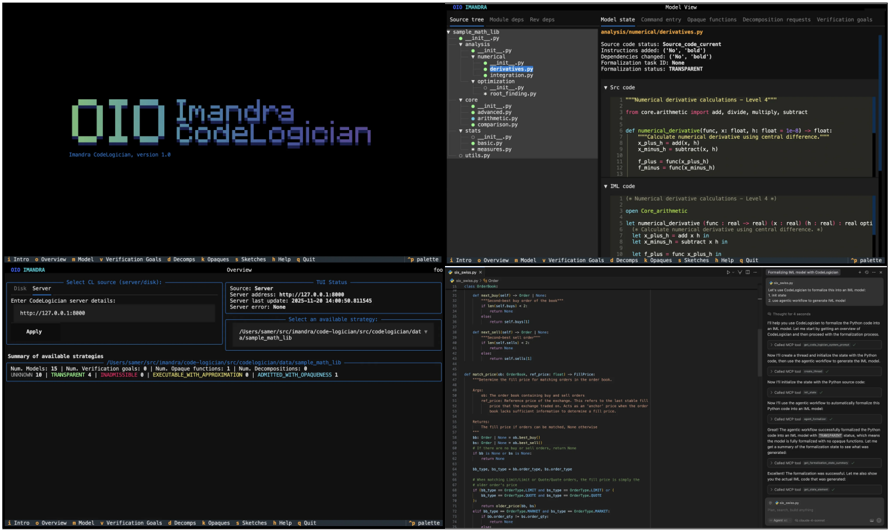
## Screenshot: Imandra CodeLogician Interface
### Overview
The image shows a screenshot of the Imandra CodeLogician interface, a software tool for formal verification and analysis of code. The interface is split into multiple panes displaying code, a file browser, a summary of analysis strategies, and a visualization of dependencies. The interface appears to be focused on a Python codebase. There are two identical windows visible, suggesting a dual-monitor setup or a duplicated view.
### Components/Axes
The interface is composed of the following key components:
* **Header:** Displays the application title "Imandra CodeLogician" and version "1.4".
* **File Browser (Left Pane):** Shows a directory structure with files and folders.
* **Code Editor (Center Pane):** Displays Python code with syntax highlighting.
* **Analysis Summary (Bottom-Left Pane):** Lists analysis strategies and their status.
* **Dependency Visualization (Bottom-Right Pane):** A graph-like representation of dependencies between modules.
* **Model State Panel (Top-Right Pane):** Displays information about the current model state, including source code status, instructions, and dependencies.
* **Console/Output Panel (Bottom-Right Pane):** Displays messages and output from the analysis process.
### Detailed Analysis or Content Details
**File Browser (Left Pane):**
* **Disk:** Shows a path: `/home/user/code/Imandra`
* **Server Address:** `http://127.0.0.1:8000`
* **Last Update:** `2023-10-26 16:43:51.821463`
* **Enter CodeLogician server details:** Input field with the current address.
* **Directory Structure:**
* `Imandra`
* `__init__.py`
* `analysis`
* `__init__.py`
* `derivatives.py`
* `optimization.py`
* `root_finding.py`
* `numerical`
* `__init__.py`
* `arithmetic.py`
* `basic.py`
* `counts.py`
* `utils.py`
* `sample_work_lib`
* `main.py`
**Analysis Summary (Bottom-Left Pane):**
* **Summary of available strategies:**
* **Main:** `NUMERICAL` (green) - `span [0, 1]` - `OK` - `DECOMPOSES`
* **Main:** `DERIVATIVES` (green) - `span [0, 1]` - `OK` - `DECOMPOSES`
* **Main:** `ROOT_FINDING` (green) - `span [0, 1]` - `OK` - `DECOMPOSES`
* **Main:** `OPTIMIZATION` (green) - `span [0, 1]` - `OK` - `DECOMPOSES`
**Dependency Visualization (Bottom-Right Pane):**
* The visualization shows a network of interconnected nodes representing modules.
* Nodes are labeled with module names (e.g., `numerical.arithmetic`, `analysis.derivatives`).
* Edges represent dependencies between modules.
* The visualization appears to be interactive, with nodes and edges highlighted upon selection.
* The color of the nodes is not consistent, but appears to be related to the type of module.
**Model State Panel (Top-Right Pane):**
* **Model state:** `Command entry`
* **Source Tree:** `Module: derivatives.py`
* **Source code status:** `Source code: current`
* **Instructions:** `added: [‘a’]`
* **Dependencies:** `[‘b’]`
* **Formalization status:** `TRANSPARENT`
* **Src code:**
```python
# Numerical derivative calculations - Level 4
from core.arithmetic import add, divide, multiply, subtract
def numerical_derivative(func, x, h=1e-6):
"""Calculate numerical derivative using central difference."""
return (func(x + h) - func(x - h)) / (2 * h)
# plans = func_plane_h_1
# plans = func_plane_h_2
```
* **DSL code:**
```python
# Numerical derivative calculations - Level 4
let func: real -> real := real func;
let x: real := real x;
let h: real := real h;
let f_plus: func x plus h
let f_minus: func x minus h
```
**Code Editor (Center Pane):**
* Displays Python code for the `numerical` and `analysis` modules.
* Includes functions for numerical derivative calculations.
* The code is well-formatted and commented.
### Key Observations
* The interface is highly structured and provides a comprehensive view of the codebase and its analysis.
* The dependency visualization is a key feature, allowing users to understand the relationships between modules.
* The analysis summary provides a clear overview of the status of different analysis strategies.
* The color-coding of analysis strategies (green = OK) indicates successful completion.
* The Model State Panel provides detailed information about the current state of the formalization process.
### Interpretation
The Imandra CodeLogician interface is designed to facilitate formal verification and analysis of Python code. The tool appears to leverage a combination of static analysis, dependency visualization, and formal methods to ensure the correctness and reliability of the code. The interface provides a user-friendly environment for developers to explore the codebase, understand its dependencies, and verify its behavior. The successful completion of analysis strategies (indicated by the green color) suggests that the code is well-structured and meets certain formal specifications. The detailed information provided in the Model State Panel allows users to track the progress of the formalization process and identify potential issues. The tool is likely used in safety-critical applications where code correctness is paramount. The dual-window setup suggests a workflow where one window is used for code editing and the other for analysis and visualization. The presence of both Python source code and a DSL (Domain Specific Language) representation suggests that the tool translates the Python code into a formal representation for analysis.