## Screenshot: Code Logician Interface
### Overview
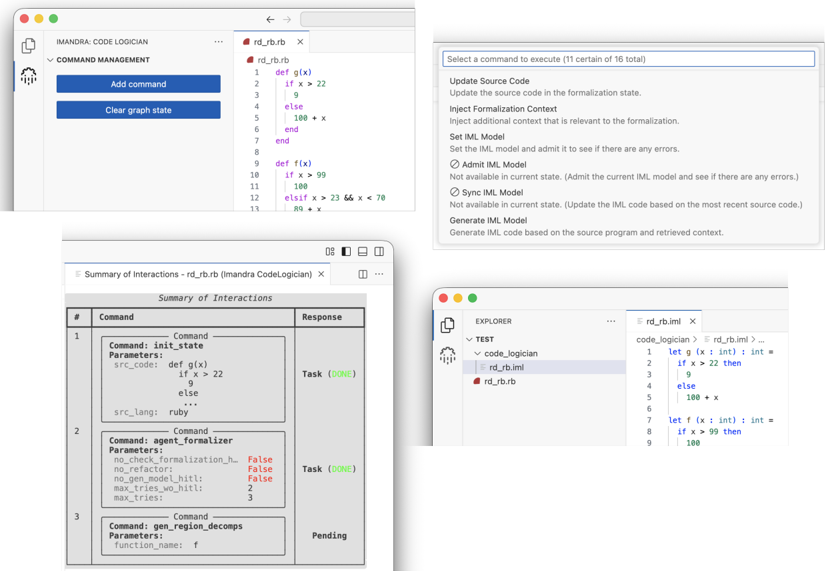
The image shows a technical interface for a code logician tool, featuring multiple panels with code snippets, command management, and interaction summaries. The interface uses syntax highlighting (red, blue, purple) and includes buttons, tables, and code execution options. The layout is divided into four distinct panels with technical annotations.
### Components/Axes
1. **Top-Left Panel**:
- Title: "IMANDRA: CODE LOGICIAN"
- Section: "COMMAND MANAGEMENT"
- Buttons: "Add command" (blue), "Clear graph state" (blue)
- Code snippet with line numbers (1-13) and syntax highlighting:
```python
def g(x):
if x > 22:
return 9
else:
return 100 + x
def f(x):
if x > 99:
return 100
else:
return 89 + x
```
2. **Bottom-Left Panel**:
- Table titled "Summary of Interactions - rd_rb.rb (Imandra CodeLogician)"
- Columns: `#`, `Command`, `Parameters`, `Response`
- Rows:
- Row 1: `Command: init_state`, `Parameters: src_code: def g(x)...`, `Response: Task (DONE)`
- Row 2: `Command: agent_formalizer`, `Parameters: no_check_formalization_h: False`, `Response: Task (DONE)`
- Row 3: `Command: gen_region_decomps`, `Parameters: function_name: f`, `Response: Pending`
3. **Top-Right Panel**:
- Dropdown titled "Select a command to execute (11 certain of 16 total)"
- Options:
- Update Source Code
- Inject Formalization Context
- Set IML Model
- Admit IML Model
- Sync IML Model
- Generate IML Model
4. **Bottom-Right Panel**:
- Code snippet with syntax highlighting:
```python
let g (x : int) : int =
if x > 22 then
9
else
100 + x
let f (x : int) : int =
if x > 99 then
100
else
89 + x
```
### Detailed Analysis
- **Code Snippets**: Functions `g(x)` and `f(x)` are defined with conditional logic. `g(x)` returns 9 if `x > 22`, else `100 + x`. `f(x)` returns 100 if `x > 99`, else `89 + x`.
- **Command Table**: Tracks interactions with commands like `init_state` (initializes state with `g(x)`), `agent_formalizer` (formalization parameters), and `gen_region_decomps` (region decomposition for function `f`).
- **Explorer Panel**: Provides code execution options, including formalization context injection and IML model generation.
### Key Observations
- The interface integrates code analysis with formal verification (IML model generation).
- The "Pending" status for `gen_region_decomps` suggests incomplete processing.
- Color coding (red for keywords, blue for function names, purple for operators) follows standard syntax highlighting conventions.
### Interpretation
This tool appears designed for developers to analyze and formalize code logic, particularly for verification or debugging purposes. The structured panels suggest a workflow where code is first defined (`g(x)`, `f(x)`), then commands are executed to analyze interactions (`init_state`, `agent_formalizer`), and finally formal models are generated. The "Pending" status indicates asynchronous processing, while the Explorer panel's options imply iterative refinement of code and models. The integration of IML (Intermediate Language Model) suggests support for formal methods, enabling developers to verify code correctness against specified properties.