\n
## Screenshot: Imandra Code Logician Interface
### Overview
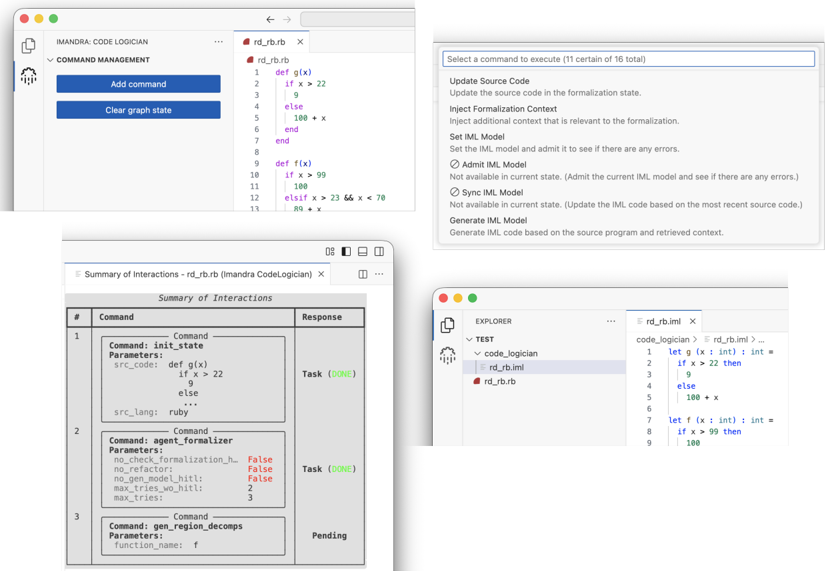
This screenshot displays the Imandra Code Logician interface, a tool for formal verification and analysis of code. The interface is divided into several panes: a command management section on the left, a code editor in the top-center, a command execution selection area in the top-right, a summary of interactions at the bottom-left, and an explorer/file browser on the bottom-right. The code being analyzed appears to be Ruby.
### Components/Axes
The interface contains the following key components:
* **Command Management:** Includes buttons for "Add command" and "Clear graph state".
* **Code Editor (rd\_rb.rb):** Displays Ruby code with line numbers.
* **Command Execution:** Presents a list of commands to execute (11 of 16 total). Options include "Update Source Code", "Inject Formalization Context", "Set IML Model", "Admit IML Model", "Sync IML Model", and "Generate IML Model".
* **Summary of Interactions (rd\_rb (Imandra CodeLogician)):** A table showing command history, parameters, and responses. Columns are labeled "Command", "Parameters", and "Response".
* **Explorer:** A file browser showing a "TEST" directory containing files "code\_logician", "rd\_rb.bimi", and "rd\_rb.rb".
* **Code Editor (rd\_rb.bimi):** Displays code with line numbers.
### Detailed Analysis or Content Details
**1. Code Editor (rd\_rb.rb):**
```
1 def g(x)
2 if x > 22
3 9
4 else
5 100 + x
6 end
7 end
8
9 def f(x)
10 if x > 99
11 100
12 elsif x > 23 && x < 70
13 99 + x
```
**2. Command Execution Options:**
* Update Source Code: Update the source code in the formalization state.
* Inject Formalization Context: Inject additional context that is relevant to the formalization.
* Set IML Model: Set the IML model and admit it to see if there are any errors.
* Admit IML Model: Not available in current state. (Admit the current IML Model and see if there are any errors.)
* Sync IML Model: Not available in current state. (Update the IML code based on the most recent source code.)
* Generate IML Model: Generate IML code based on the source program and retrieved context.
**3. Summary of Interactions:**
| # | Command | Parameters | Response |
|---|-------------------|------------------------------------------|----------|
| 1 | init\_state | src\_code: `def g(x) if x > 22 then 9 else 100 + x end` | Task (0/0s) |
| 2 | agent\_formalizer | no\_check\_formalization\_h: False, no\_refactors: False, max\_gen\_model\_hit: 1, max\_tries\_wo\_hit: 2 | Task (0/0s) |
| 3 | gen\_region\_decomp | function\_name: x | Pending |
**4. Code Editor (rd\_rb.bimi):**
```
1 let g x : int -> int =
2 if x > 22 then
3 9
4 else
5 100 + x
6
7 let f x : int -> int =
8 if x > 99 then
9 100
```
### Key Observations
* The interface is actively processing commands, as indicated by the "Task (0/0s)" and "Pending" statuses.
* The code in `rd_rb.rb` defines two functions, `g(x)` and `f(x)`, with conditional logic.
* The `rd_rb.bimi` file appears to contain a formalization of the Ruby code in a different language (likely a formal specification language).
* Some commands are unavailable in the current state ("Admit IML Model", "Sync IML Model").
* The "Summary of Interactions" shows a sequence of commands: initialization, formalization, and region decomposition.
### Interpretation
The screenshot depicts a workflow within Imandra Code Logician for formally verifying Ruby code. The process involves:
1. **Loading Source Code:** The Ruby code in `rd_rb.rb` is loaded into the system.
2. **Formalization:** The `agent_formalizer` command translates the Ruby code into a formal specification (represented in `rd_rb.bimi`). This formalization allows for rigorous analysis.
3. **Region Decomposition:** The `gen_region_decomp` command likely breaks down the code into smaller, manageable regions for analysis.
4. **Model Checking/Verification:** The "Set IML Model" and "Admit IML Model" commands (currently unavailable) would be used to build and verify a model of the code's behavior against the formal specification.
The interface suggests that the user is in the process of setting up a formal verification task. The "Pending" status of the `gen_region_decomp` command indicates that this step is currently in progress. The unavailable commands suggest that the formalization and region decomposition steps must be completed before model checking can begin. The presence of both Ruby code and a formal specification highlights the tool's ability to bridge the gap between informal source code and rigorous mathematical analysis. The `bimi` file extension suggests a specific format used by Imandra for representing formal specifications.