## Diagram: Item Type and Sub-Tasks Breakdown
### Overview
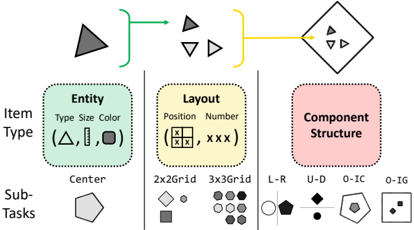
The image presents a diagram that breaks down "Item Type" into three components: Entity, Layout, and Component Structure. It also shows examples of sub-tasks related to each component. The diagram uses visual elements like shapes, colors, and arrows to illustrate the relationships between these components.
### Components/Axes
* **Item Type:** The main category being broken down.
* **Sub-Tasks:** Examples of tasks related to each component of Item Type.
* **Entity:**
* Attributes: Type, Size, Color
* Examples: Triangle (Δ), Line (|), Square (□)
* **Layout:**
* Attributes: Position, Number
* Examples: 2x2 Grid, 3x3 Grid
* **Component Structure:**
* Examples: Left-Right (L-R), Up-Down (U-D), Outside-In Component (O-IC), Outside-In Group (O-IG)
### Detailed Analysis
* **Entity:** The "Entity" section shows three shapes: a triangle, a line, and a square. These represent different types of entities that can be part of an item.
* **Layout:** The "Layout" section illustrates how entities can be arranged. It shows a 2x2 grid and a 3x3 grid as examples of different layouts.
* **Component Structure:** This section shows how components can be structured.
* **L-R:** A circle and a pentagon are placed side-by-side, indicating a left-to-right relationship.
* **U-D:** A diamond is placed above a circle, indicating an up-down relationship.
* **O-IC:** A pentagon is placed around a smaller pentagon, indicating an outside-in component structure.
* **O-IG:** A square contains two smaller squares, indicating an outside-in group structure.
* **Sub-Tasks:** A pentagon is shown under the "Center" label, representing a sub-task related to centering an item.
* **Arrows:**
* A green arrow connects a gray triangle to a group of smaller triangles (some gray, some white).
* A yellow arrow connects the group of smaller triangles to a diamond containing even smaller triangles.
### Key Observations
* The diagram uses shapes and spatial arrangement to represent different aspects of item types and their components.
* The arrows indicate a flow or transformation from a single entity to a group of entities, and then to a structured component.
* The sub-tasks provide concrete examples of actions that can be performed on items.
### Interpretation
The diagram provides a visual framework for understanding the different aspects of an "Item Type." It breaks down the concept into three key components: Entity, Layout, and Component Structure. The examples provided for each component help to illustrate the different possibilities and variations. The sub-tasks provide a practical application of these concepts. The diagram suggests that understanding these components is essential for effectively working with and manipulating items. The arrows suggest a process of aggregation and structuring, where individual entities are combined and arranged to form more complex components.