## Diagram: Enabling 'Do Not Track' in Chrome
### Overview
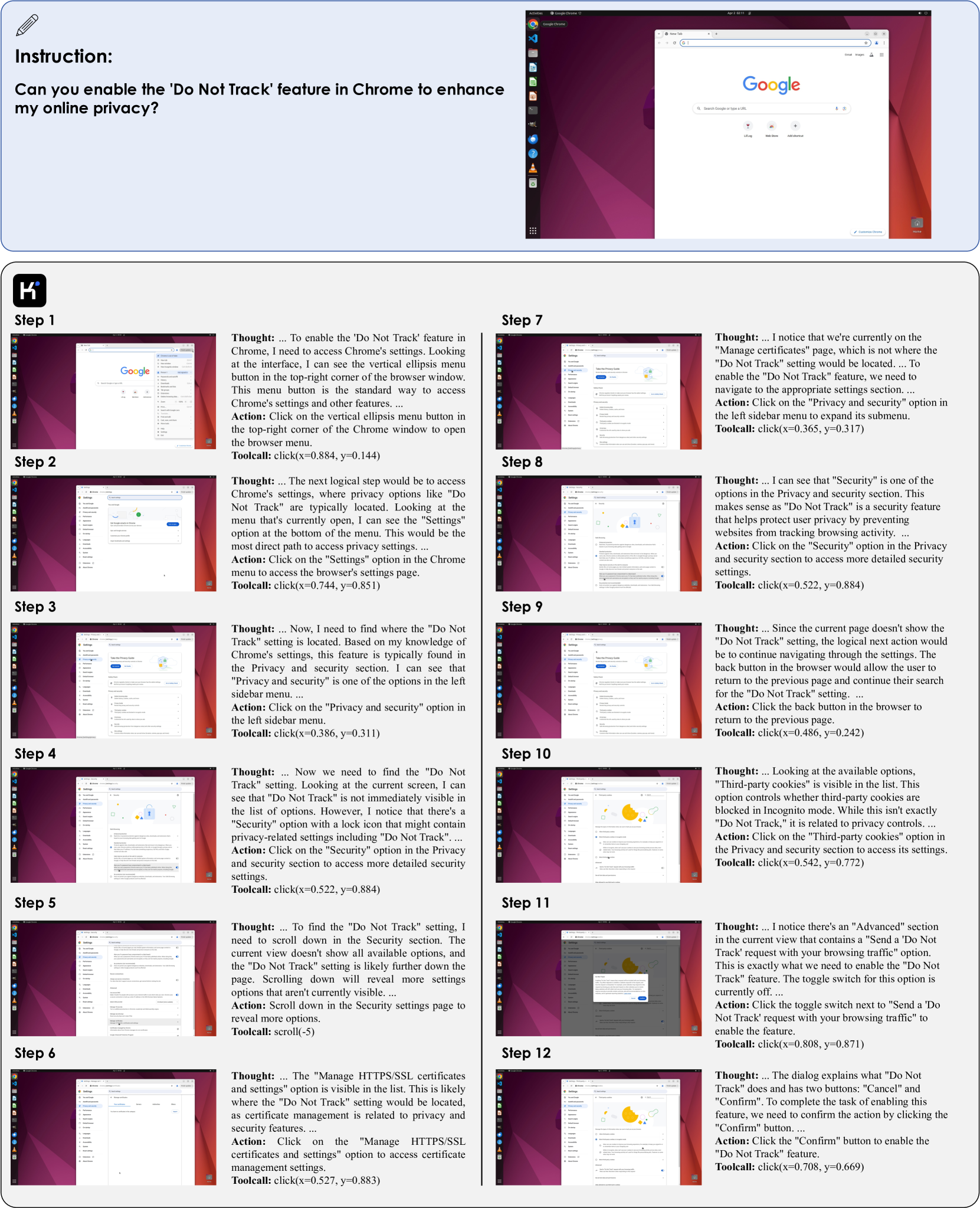
The image is a step-by-step guide, with screenshots, on how to enable the "Do Not Track" feature in the Chrome browser. Each step includes a screenshot of the Chrome interface, a "Thought" section explaining the reasoning behind the action, and an "Action" section describing the user's action.
### Components/Axes
The image is structured as a sequence of steps, numbered from 1 to 12. Each step contains:
- **Step Number**: Indicates the sequence of actions.
- **Screenshot**: A visual representation of the Chrome browser window at that stage.
- **Thought**: A textual description of the user's reasoning and observations.
- **Action**: A textual description of the action the user should take.
- **Toolcall**: Specifies the coordinates of the click action.
### Detailed Analysis or ### Content Details
**Step 1:**
- **Screenshot**: Shows the default Google search page in Chrome.
- **Thought**: The user needs to access Chrome's settings and identifies the vertical ellipsis menu button in the top-right corner.
- **Action**: Click on the vertical ellipsis menu button.
- **Toolcall**: click(x=0.884, y=0.144)
**Step 2:**
- **Screenshot**: Shows the Chrome menu that appears after clicking the ellipsis button.
- **Thought**: The user identifies the "Settings" option at the bottom of the menu.
- **Action**: Click on the "Settings" option.
- **Toolcall**: click(x=0.744, y=0.851)
**Step 3:**
- **Screenshot**: Shows the Chrome settings page.
- **Thought**: The user looks for the "Do Not Track" setting and identifies the "Privacy and security" option in the left sidebar menu.
- **Action**: Click on the "Privacy and security" option.
- **Toolcall**: click(x=0.386, y=0.311)
**Step 4:**
- **Screenshot**: Shows the Privacy and security settings page.
- **Thought**: The user notes that "Do Not Track" is not immediately visible but identifies a "Security" option with a lock icon.
- **Action**: Click on the "Security" option.
- **Toolcall**: click(x=0.522, y=0.884)
**Step 5:**
- **Screenshot**: Shows the Security settings page.
- **Thought**: The user needs to scroll down to find the "Do Not Track" setting.
- **Action**: Scroll down in the Security settings page.
- **Toolcall**: scroll(-5)
**Step 6:**
- **Screenshot**: Shows the Security settings page after scrolling.
- **Thought**: The user sees the "Manage HTTPS/SSL certificates and settings" option.
- **Action**: Click on the "Manage HTTPS/SSL certificates and settings" option.
- **Toolcall**: click(x=0.527, y=0.883)
**Step 7:**
- **Screenshot**: Shows the "Manage certificates" page.
- **Thought**: The user realizes they are on the wrong page and need to go back to the Privacy and security section.
- **Action**: Click on the "Privacy and security" option in the left sidebar menu.
- **Toolcall**: click(x=0.365, y=0.317)
**Step 8:**
- **Screenshot**: Shows the Privacy and security settings page again.
- **Thought**: The user identifies the "Security" option within the Privacy and security section.
- **Action**: Click on the "Security" option.
- **Toolcall**: click(x=0.522, y=0.884)
**Step 9:**
- **Screenshot**: Shows the Security settings page.
- **Thought**: The user decides to go back to the previous page.
- **Action**: Click the back button in the browser.
- **Toolcall**: click(x=0.486, y=0.242)
**Step 10:**
- **Screenshot**: Shows the Privacy and security settings page.
- **Thought**: The user identifies the "Third-party cookies" option.
- **Action**: Click on the "Third-party cookies" option.
- **Toolcall**: click(x=0.542, y=0.772)
**Step 11:**
- **Screenshot**: Shows the "Third-party cookies" settings page.
- **Thought**: The user identifies the "Advanced" section containing the "Send a 'Do Not Track' request with your browsing traffic" option.
- **Action**: Click the toggle switch next to "Send a 'Do Not Track' request with your browsing traffic".
- **Toolcall**: click(x=0.808, y=0.871)
**Step 12:**
- **Screenshot**: Shows a confirmation dialog.
- **Thought**: The user needs to confirm the action.
- **Action**: Click the "Confirm" button.
- **Toolcall**: click(x=0.708, y=0.669)
### Key Observations
- The process involves navigating through Chrome's settings, specifically the Privacy and security section.
- The user initially makes a wrong turn by selecting "Manage HTTPS/SSL certificates and settings" and needs to backtrack.
- The "Do Not Track" setting is found within the "Third-party cookies" settings page under the "Advanced" section.
### Interpretation
The guide demonstrates how to enable the "Do Not Track" feature in Chrome. It highlights the somewhat convoluted path to find this setting, requiring multiple steps and a brief detour. The "Thought" sections provide valuable context, explaining the user's reasoning and decision-making process at each step. The guide emphasizes the importance of navigating through the settings and identifying the correct options to achieve the desired outcome. The toolcall coordinates provide precise locations for the click actions, making the guide highly actionable.