## Screenshot: Answer Form with Instructions
### Overview
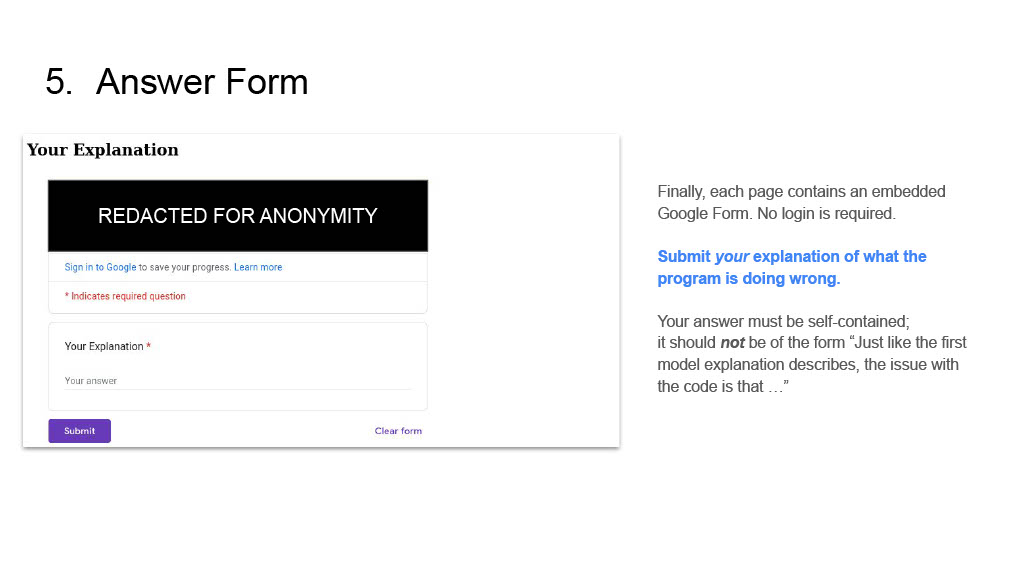
This image displays a screenshot of a web page or document section titled "5. Answer Form". It features an embedded Google Form on the left side, designed for submitting an explanation, and accompanying textual instructions on the right side. The form includes a redacted section, a prompt to sign in to Google, a required text input field for "Your Explanation", and submission buttons. The instructions clarify the purpose of the form and provide guidelines for the answer format.
### Components/Axes
The image is divided into a main header and two primary content panels:
**Header (Top-Left):**
* **Title:** "5. Answer Form"
**Left Panel (Embedded Google Form - within a light grey bordered box):**
* **Form Title:** "Your Explanation" (bold, top of the form box)
* **Redaction Block:** A prominent black rectangular box with white text centered: "REDACTED FOR ANONYMITY"
* **Sign-in Prompt:** Below the redaction block, a line of text: "Sign in to Google to save your progress. Learn more"
* "Sign in to Google" is blue, indicating a hyperlink.
* "Learn more" is blue, indicating a hyperlink.
* **Required Question Indicator:** Below the sign-in prompt, a line of red text: "* Indicates required question"
* **Input Field Label:** "Your Explanation *" (The asterisk indicates a required field).
* **Input Field Placeholder:** Within the text input area, light grey text reads: "Your answer"
* **Action Buttons (Bottom of Form):**
* **Submit Button:** A rectangular button on the bottom-left with a purple background and white text: "Submit"
* **Clear Form Link:** A text link on the bottom-right: "Clear form"
**Right Panel (Instructions - plain text):**
* **General Information Paragraph:** "Finally, each page contains an embedded Google Form. No login is required."
* **Primary Instruction:** A line of blue, bold, and slightly italicized text: "Submit *your explanation* of what the program is doing wrong."
* **Answer Format Guideline Paragraph:** "Your answer must be self-contained; it should **not** be of the form "Just like the first model explanation describes, the issue with the code is that ..."" (The word "not" is bolded for emphasis).
### Detailed Analysis
The image presents a user interface for submitting an explanation, likely in an educational or technical assessment context. The form is clearly identified as a Google Form, with an explicit statement that no login is required, suggesting ease of access. The "REDACTED FOR ANONYMITY" block implies that some prior content, possibly sensitive or identifying information, has been intentionally obscured from the screenshot.
The core task for the user is to provide "Your Explanation" in the designated text field, which is marked as a required question. The instructions on the right provide crucial context and constraints:
1. **Purpose:** The explanation should detail "what the program is doing wrong."
2. **Self-Contained:** The answer must be complete on its own.
3. **Format Restriction:** The answer should *not* reference external content or previous examples in a comparative manner (e.g., "Just like the first model explanation describes..."). This implies the explanation should be original and independent.
The presence of "Sign in to Google to save your progress" suggests that while login is not required for submission, it is an option for users who wish to save their work, indicating a potentially longer or more complex explanation might be expected.
### Key Observations
* The page is structured to guide the user through a submission process.
* Anonymity is a stated concern, as indicated by the "REDACTED FOR ANONYMITY" block.
* The form is an embedded Google Form, offering a familiar interface.
* The instructions are clear about the content and format expectations for the submitted explanation, particularly emphasizing self-containment and avoiding comparative phrasing.
* The "Submit" and "Clear form" buttons provide standard form interaction.
### Interpretation
This document section appears to be part of an online learning platform, assessment, or technical review process where users are required to analyze a program and articulate its flaws. The "5. Answer Form" title suggests it's the fifth step in a sequence.
The "REDACTED FOR ANONYMITY" block, combined with the option to sign in to Google to save progress (but not requiring it for submission), points to a system designed to collect explanations while potentially maintaining the anonymity of the submitter during evaluation, or at least ensuring the submission itself is anonymous. The redaction might cover details about the specific program being analyzed or the context of the task.
The instructions are critical for ensuring high-quality, independent responses. By stating that the answer "must be self-contained" and "should **not** be of the form 'Just like the first model explanation describes...'", the system is likely trying to prevent plagiarism, encourage original thought, and ensure each explanation can be understood without external context. This suggests that the explanations will be evaluated individually, possibly by different reviewers or against a rubric that doesn't assume knowledge of other submissions or model answers. The emphasis on "what the program is doing wrong" indicates a focus on debugging, error identification, or critical analysis skills.