## Labeling Interface: Question and Answer Selection
### Overview
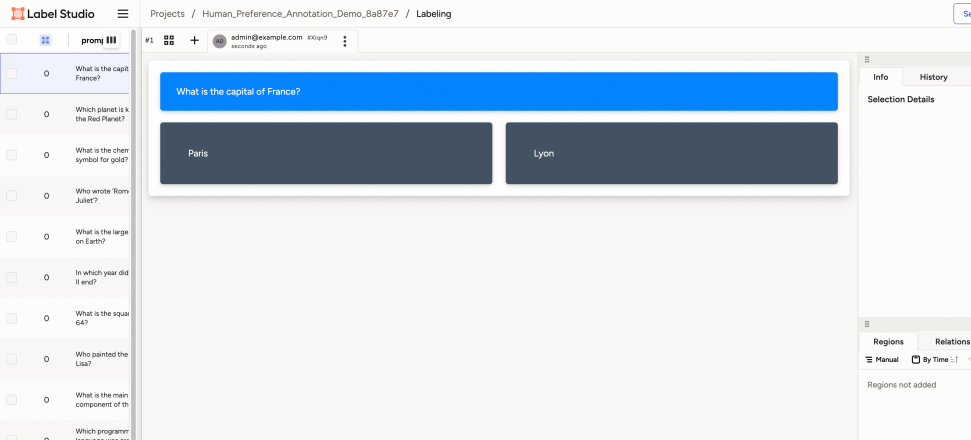
The image shows a user interface for a labeling task, likely within a platform like Label Studio. The interface presents a question and two possible answers, allowing a user to select the correct one. The left side displays a list of questions, while the right side shows details and options related to the selected question.
### Components/Axes
* **Header**: "Label Studio", "Projects / Human\_Preference\_Annotation\_Demo\_8a87e7 / Labeling"
* **Left Sidebar**:
* A list of questions, each with a checkbox and a numerical indicator (likely representing the number of times the question has been labeled).
* Example questions: "What is the capital of France?", "Which planet is k the Red Planet?", "What is the chemical symbol for gold?", "Who wrote 'Rom Juliet'?", "What is the large on Earth?", "In which year did II end?", "What is the square 64?", "Who painted the Lisa?", "What is the main component of th", "Which programm"
* **Main Content Area**:
* Question prompt: "What is the capital of France?" (in a blue box)
* Answer options: "Paris" and "Lyon" (in dark gray boxes)
* **Right Sidebar**:
* Tabs: "Info" and "History"
* Section: "Selection Details"
* Tabs: "Regions" and "Relations"
* Options: "Manual" and "By Time"
* Text: "Regions not added"
### Detailed Analysis or ### Content Details
* **Question List**: The left sidebar contains a scrollable list of questions. Each question has a checkbox and a number (likely a count).
* **Question Prompt**: The main content area displays the current question in a prominent blue box.
* **Answer Options**: Two answer options, "Paris" and "Lyon", are presented in dark gray boxes below the question.
* **User Information**: The top-right of the main content area shows user information: "admin@example.com" and a timestamp indicating when the question was presented ("seconds ago").
* **Right Sidebar Tabs**: The right sidebar provides additional information and options related to the selected question. The "Info" tab is selected, displaying "Selection Details". The "Regions" tab is selected, displaying "Regions not added".
### Key Observations
* The interface is designed for a question-answering labeling task.
* The left sidebar provides a list of questions to be labeled.
* The main content area presents the current question and answer options.
* The right sidebar provides additional information and options.
### Interpretation
The image depicts a typical labeling interface used for training machine learning models. The user is presented with a question and must select the correct answer from the provided options. The interface tracks user activity and provides tools for managing and reviewing the labeling process. The presence of "Regions" and "Relations" tabs suggests that the labeling task might involve more complex annotations than simple question answering, potentially including identifying regions of interest in images or defining relationships between entities.