## Image Comparison: Progressive LOD vs. Non-Progressive LOD
### Overview
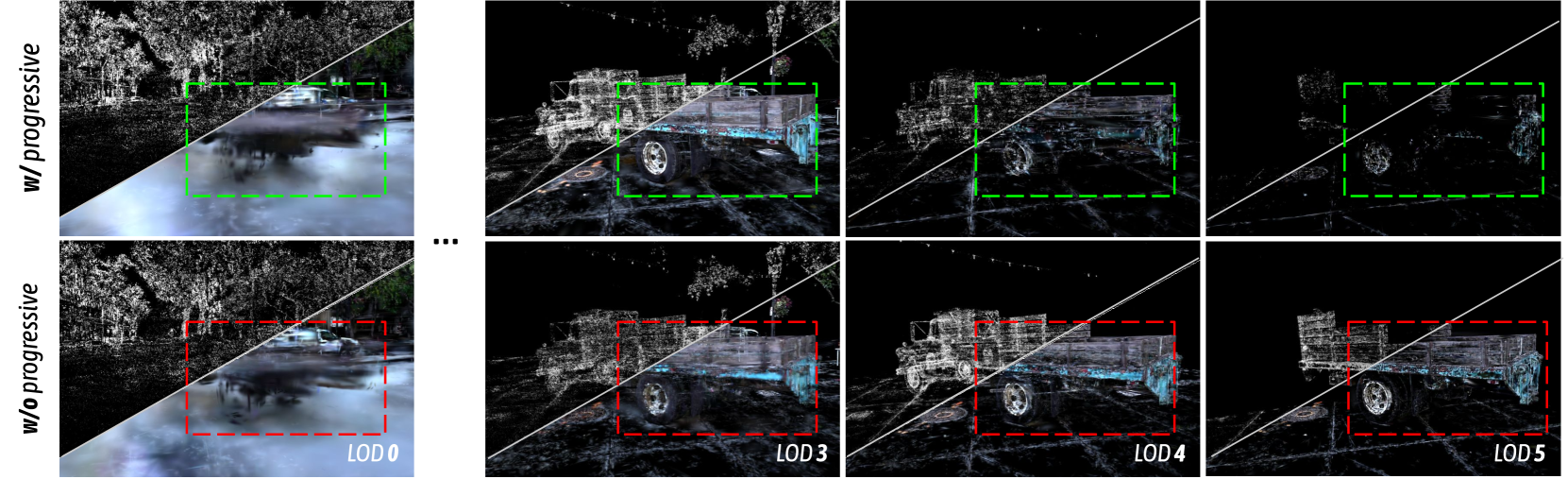
The image presents a visual comparison of rendering scenes with and without progressive Level of Detail (LOD) loading. It showcases how the scene's appearance changes with increasing LOD levels (0, 3, 4, and 5) under two different rendering approaches: one using progressive loading and the other without. The scene on the left depicts a rainy street with a car, while the scenes on the right depict a truck. Each scene is split diagonally, with the top half rendered with progressive loading and the bottom half without.
### Components/Axes
* **Rows:** Two rows, labeled "w/ progressive" (top row) and "w/o progressive" (bottom row).
* **Columns:** Four columns representing different LOD levels: LOD 0, LOD 3, LOD 4, and LOD 5.
* **Diagonal Division:** Each image is divided diagonally from the bottom-left to the top-right. The top-left triangle shows the scene rendered with progressive loading, while the bottom-right triangle shows the scene rendered without progressive loading.
* **Bounding Boxes:** Green dashed bounding boxes highlight a specific region in the "w/ progressive" images. Red dashed bounding boxes highlight a specific region in the "w/o progressive" images.
### Detailed Analysis
**Column 1: LOD 0**
* **Scene:** Rainy street with a car.
* **w/ progressive (top-left):** The top-left triangle shows a noisy, sparse point cloud representation of the scene.
* **w/o progressive (bottom-right):** The bottom-right triangle shows a blurred, low-resolution image of the scene.
**Column 2: LOD 3**
* **Scene:** Truck.
* **w/ progressive (top-left):** The top-left triangle shows a more defined point cloud representation of the truck, with some details visible.
* **w/o progressive (bottom-right):** The bottom-right triangle shows a more defined image of the truck, with some details visible.
**Column 3: LOD 4**
* **Scene:** Truck.
* **w/ progressive (top-left):** The top-left triangle shows a further refined point cloud representation of the truck, with more details visible.
* **w/o progressive (bottom-right):** The bottom-right triangle shows a more refined image of the truck, with more details visible.
**Column 4: LOD 5**
* **Scene:** Truck.
* **w/ progressive (top-left):** The top-left triangle shows a highly detailed point cloud representation of the truck.
* **w/o progressive (bottom-right):** The bottom-right triangle shows a highly detailed image of the truck.
### Key Observations
* **Progressive Loading:** The "w/ progressive" row demonstrates how the scene gradually refines as the LOD level increases. The initial representation (LOD 0) is a sparse point cloud, which becomes denser and more detailed with higher LOD levels.
* **Non-Progressive Loading:** The "w/o progressive" row shows how the scene appears only when the specified LOD level is fully loaded. The initial representation (LOD 0) is a low-resolution blur, which becomes sharper and more detailed with higher LOD levels.
* **Visual Difference:** The diagonal split highlights the difference between the two approaches at each LOD level. Progressive loading provides an initial representation of the scene quickly, which is then refined over time. Non-progressive loading waits until the specified LOD level is fully loaded before displaying the scene.
### Interpretation
The image illustrates the trade-offs between progressive and non-progressive LOD loading. Progressive loading offers a faster initial rendering, allowing users to see a basic representation of the scene quickly. This is useful for interactive applications where responsiveness is important. Non-progressive loading, on the other hand, provides a higher-quality rendering once the specified LOD level is fully loaded. This is suitable for applications where visual fidelity is paramount, and initial loading time is less of a concern. The choice between the two approaches depends on the specific requirements of the application and the desired user experience.