## Image Comparison: 3D-GS vs. Anchor-3D-GS vs. Our-3D-GS
### Overview
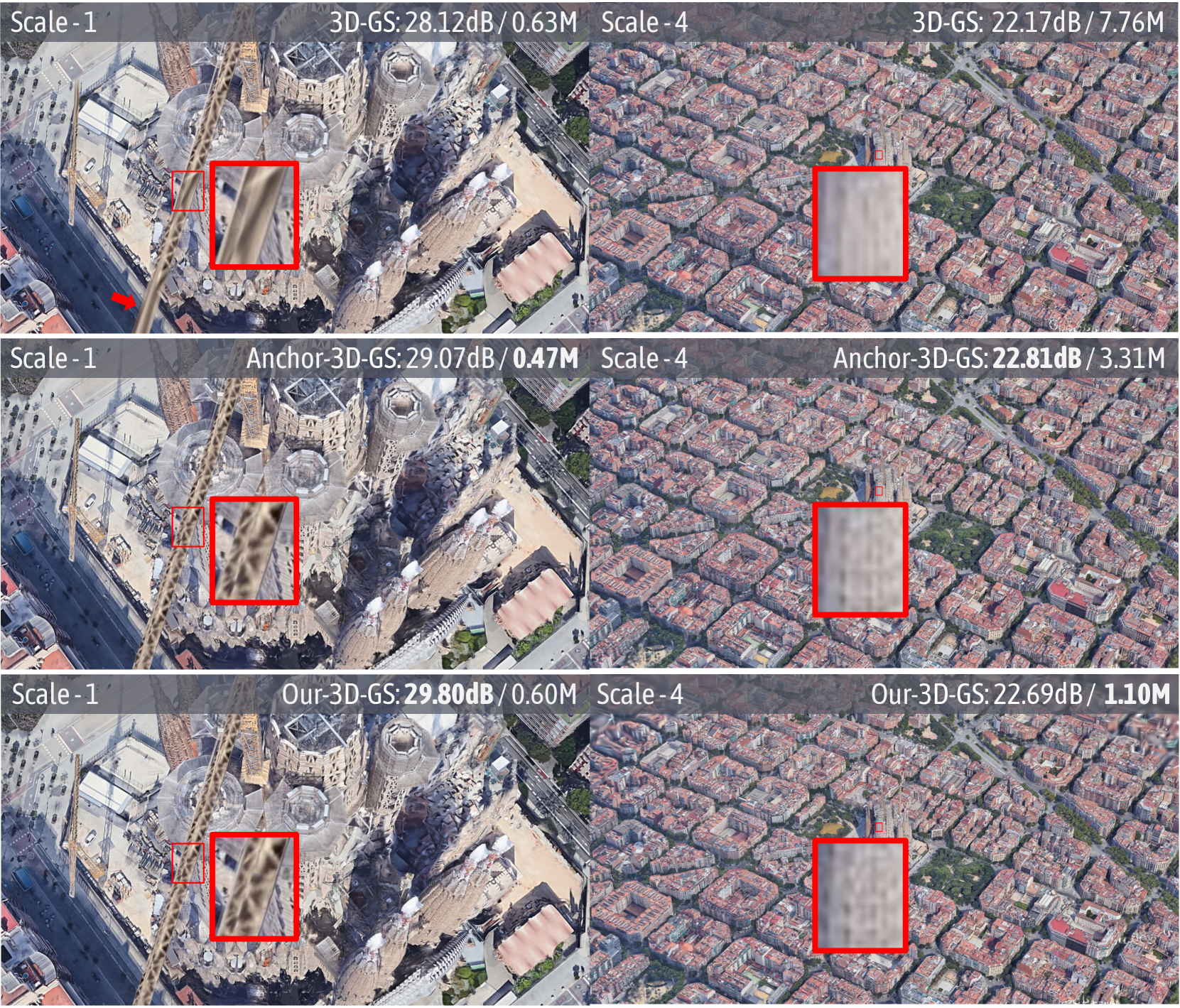
The image presents a visual comparison of three different methods (3D-GS, Anchor-3D-GS, and Our-3D-GS) for rendering a 3D scene at two different scales (Scale-1 and Scale-4). Each method is evaluated based on two metrics: a dB value (likely a signal-to-noise ratio or similar quality metric) and a value in "M" (likely representing memory usage in Megabytes). The scene appears to be an aerial view of a city, with a detailed view of a building (likely Sagrada Familia) at Scale-1 and a broader view of the city at Scale-4. Red boxes highlight specific areas for closer inspection.
### Components/Axes
* **Rows:** Each row represents a different method:
* Row 1: 3D-GS
* Row 2: Anchor-3D-GS
* Row 3: Our-3D-GS
* **Columns:** Each column represents a different scale:
* Column 1: Scale-1 (detailed view of a building)
* Column 2: Scale-4 (broader view of the city)
* **Metrics:** Each image is labeled with two metrics:
* dB value (e.g., 28.12dB) - likely a measure of image quality or signal-to-noise ratio.
* Value in "M" (e.g., 0.63M) - likely memory usage in Megabytes.
* **Red Boxes:** Each image contains one or two red boxes highlighting a specific region for closer inspection.
### Detailed Analysis or ### Content Details
**Row 1: 3D-GS**
* **Scale-1:**
* Label: "Scale -1" (top-left)
* Metric: "3D-GS: 28.12dB / 0.63M" (top-right)
* Image: Detailed view of a building (Sagrada Familia). A red arrow points to a specific area. A small red box highlights a region, and a larger red box zooms in on that region.
* **Scale-4:**
* Label: "Scale - 4" (top-left)
* Metric: "3D-GS: 22.17dB / 7.76M" (top-right)
* Image: Broader aerial view of a city. A red box highlights a region.
**Row 2: Anchor-3D-GS**
* **Scale-1:**
* Label: "Scale -1" (top-left)
* Metric: "Anchor-3D-GS: 29.07dB / 0.47M" (top-right)
* Image: Detailed view of a building (Sagrada Familia). A small red box highlights a region, and a larger red box zooms in on that region.
* **Scale-4:**
* Label: "Scale - 4" (top-left)
* Metric: "Anchor-3D-GS: 22.81dB / 3.31M" (top-right)
* Image: Broader aerial view of a city. A red box highlights a region.
**Row 3: Our-3D-GS**
* **Scale-1:**
* Label: "Scale -1" (top-left)
* Metric: "Our-3D-GS: 29.80dB / 0.60M" (top-right)
* Image: Detailed view of a building (Sagrada Familia). A small red box highlights a region, and a larger red box zooms in on that region.
* **Scale-4:**
* Label: "Scale - 4" (top-left)
* Metric: "Our-3D-GS: 22.69dB / 1.10M" (top-right)
* Image: Broader aerial view of a city. A red box highlights a region.
### Key Observations
* **dB Values:** At Scale-1, "Our-3D-GS" has the highest dB value (29.80dB), followed by "Anchor-3D-GS" (29.07dB) and then "3D-GS" (28.12dB). At Scale-4, "Anchor-3D-GS" has the highest dB value (22.81dB), followed by "Our-3D-GS" (22.69dB) and then "3D-GS" (22.17dB).
* **Memory Usage:** At Scale-1, "Anchor-3D-GS" has the lowest memory usage (0.47M), followed by "Our-3D-GS" (0.60M) and then "3D-GS" (0.63M). At Scale-4, "Our-3D-GS" has the lowest memory usage (1.10M), followed by "Anchor-3D-GS" (3.31M) and then "3D-GS" (7.76M).
* **Visual Detail:** The red boxes highlight areas where the visual differences between the methods are likely most apparent.
### Interpretation
The image presents a performance comparison of three different 3D rendering techniques. The dB values suggest the quality of the rendering, with higher values indicating better quality. The "M" values indicate the memory footprint of each method.
At Scale-1 (detailed view), "Our-3D-GS" appears to offer the best quality (highest dB) with a memory footprint comparable to "3D-GS". "Anchor-3D-GS" has the lowest memory usage but a slightly lower dB value.
At Scale-4 (broader view), "Anchor-3D-GS" has the highest dB value, while "Our-3D-GS" has the lowest memory usage. "3D-GS" has the lowest dB value and the highest memory usage.
The choice of which method is "best" depends on the specific application and the trade-off between quality and memory usage. If memory is a primary constraint, "Our-3D-GS" might be preferred at Scale-4. If quality is paramount, "Our-3D-GS" might be preferred at Scale-1, and "Anchor-3D-GS" at Scale-4. The red boxes are intended to allow visual inspection of the rendering quality in specific areas of the scene.