## Line Chart: Accuracy vs. Thinking Compute
### Overview
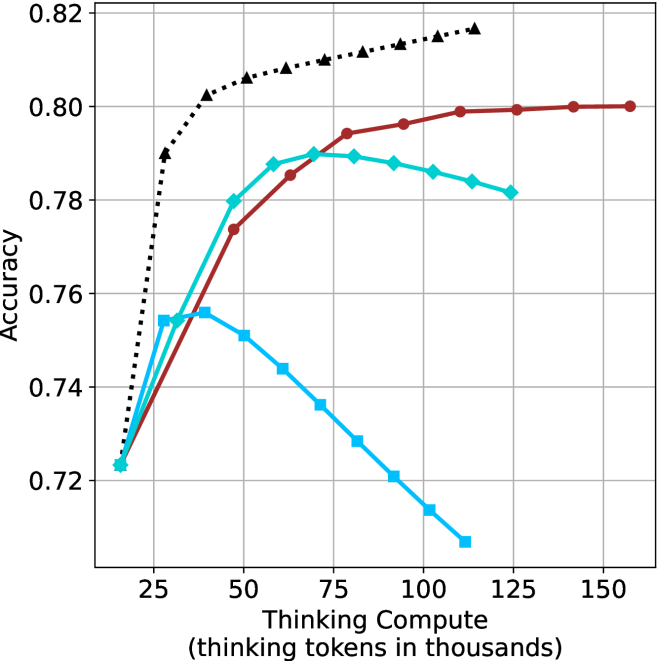
The image is a line chart illustrating the relationship between "Thinking Compute" (measured in thousands of thinking tokens) and model "Accuracy." The chart displays four distinct data series, all originating from a common baseline at approximately 15-18k tokens and 0.723 accuracy. The chart demonstrates that increasing compute does not universally improve accuracy; rather, different models or configurations exhibit distinct performance curves, with some showing diminishing returns or performance degradation (overthinking) at higher compute levels.
**Note:** The image lacks a legend, so the specific identity of each data series (e.g., model name or configuration) is not provided.
### Components/Axes
* **Y-Axis:** Labeled "Accuracy." The scale ranges from 0.72 to 0.82, with major grid lines at 0.02 intervals.
* **X-Axis:** Labeled "Thinking Compute (thinking tokens in thousands)." The scale ranges from 25 to 150, with major grid lines at 25-unit intervals. The data series begin to the left of the 25 mark, at approximately 15-18k tokens.
* **Grid:** A standard Cartesian grid with light gray lines.
* **Data Series (identified by marker/line style):**
1. **Black Dotted Line:** Marked with triangles.
2. **Dark Red Solid Line:** Marked with circles.
3. **Teal Solid Line:** Marked with diamonds.
4. **Light Blue Solid Line:** Marked with squares.
### Detailed Analysis
#### 1. Black Dotted Line (Triangles)
* **Trend:** This series shows the strongest performance. It exhibits a steep initial upward slope, followed by a continued, albeit slower, upward trajectory throughout the entire compute range. It does not show signs of peaking or declining within the visible range.
* **Approximate Data Points:**
* Start: (18, 0.723)
* (28, 0.79)
* (40, 0.802)
* (60, 0.808)
* (80, 0.811)
* (100, 0.814)
* (125, 0.817)
#### 2. Dark Red Solid Line (Circles)
* **Trend:** This series shows a steady, consistent upward slope. It flattens out significantly after 100k tokens, suggesting diminishing returns, but maintains a positive or neutral trend without declining.
* **Approximate Data Points:**
* Start: (18, 0.723)
* (45, 0.774)
* (60, 0.785)
* (80, 0.794)
* (100, 0.796)
* (125, 0.799)
* (160, 0.80)
#### 3. Teal Solid Line (Diamonds)
* **Trend:** This series rises sharply initially, peaks, and then exhibits a gradual decline. It appears to reach its optimal performance around 75k tokens.
* **Approximate Data Points:**
* Start: (18, 0.723)
* (30, 0.754)
* (45, 0.78)
* (60, 0.788)
* (75, 0.79)
* (95, 0.788)
* (110, 0.786)
* (125, 0.782)
#### 4. Light Blue Solid Line (Squares)
* **Trend:** This series shows the poorest performance at higher compute levels. It rises slightly, peaks very early (around 40k tokens), and then declines steadily and significantly as compute increases.
* **Approximate Data Points:**
* Start: (18, 0.723)
* (30, 0.754)
* (40, 0.756)
* (50, 0.751)
* (70, 0.736)
* (90, 0.72)
* (110, 0.707)
### Key Observations
* **The "Overthinking" Penalty:** The Teal and Light Blue lines clearly demonstrate that increasing compute beyond a certain threshold is detrimental to accuracy. This is a classic "overthinking" phenomenon where the model likely introduces errors or hallucinations by generating excessive tokens.
* **Divergence:** While all models start at the same baseline, they diverge rapidly after 25k tokens.
* **Scalability:** The Black Dotted model is the only one that appears to scale effectively with increased compute, suggesting it is the most robust architecture or configuration among the four.
### Interpretation
This chart is a visualization of the "Test-Time Compute" scaling laws for reasoning models. It demonstrates that "more thinking" is not always better.
* **The Black Dotted line** represents a model that effectively utilizes additional compute to refine its reasoning, likely indicating a more capable base model or a more efficient reasoning strategy.
* **The Light Blue and Teal lines** represent models that are highly sensitive to compute allocation. They have a "sweet spot" (peak accuracy). Beyond this peak, the additional tokens likely represent redundant or erroneous reasoning paths that confuse the final output, leading to a degradation in accuracy.
* **Strategic Implication:** For a developer, this chart suggests that simply increasing the token limit for a model is not a universal solution. One must identify the optimal compute "budget" for a specific model to maximize performance and avoid the performance degradation seen in the lower-performing series.