## Flowchart: Multi-Agent System Workflow
### Overview
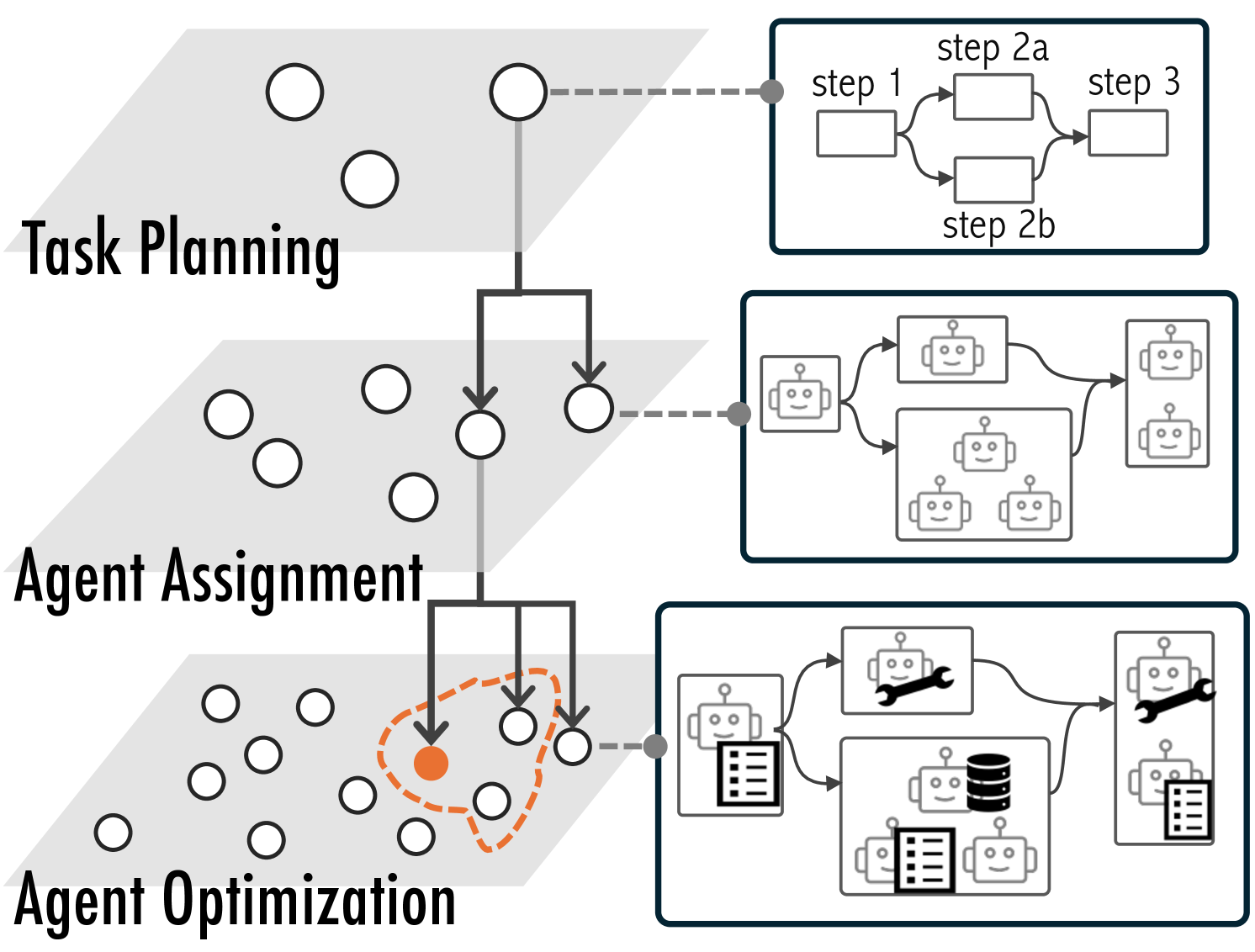
The image depicts a three-stage workflow for a multi-agent system, visualized as a hierarchical flowchart with interconnected components. The stages are labeled "Task Planning," "Agent Assignment," and "Agent Optimization," with directional arrows indicating process flow. Key elements include decision nodes, agent representations, and optimization tools.
### Components/Axes
1. **Task Planning Section**
- Flowchart with labeled steps:
- Step 1 → Step 2a → Step 3
- Step 1 → Step 2b → Step 3
- Arrows indicate branching logic (e.g., conditional paths).
2. **Agent Assignment Section**
- Central node with arrows connecting to multiple agent nodes (represented by robot icons).
- One agent node is highlighted with an orange dashed circle, suggesting selection or prioritization.
3. **Agent Optimization Section**
- Subcomponents:
- Robot with a wrench (tooling/optimization).
- Robot with a document (task execution).
- Database icon (data storage/retrieval).
- Arrows show interactions between agents, tools, and data.
### Detailed Analysis
- **Task Planning**:
- Step 1 branches into two paths (2a and 2b), both converging at Step 3. This suggests parallel processing or decision-making.
- No numerical values are present; steps are abstractly labeled.
- **Agent Assignment**:
- Central node distributes tasks to agents (robot icons).
- The orange dashed circle around one agent implies it is either the primary agent or a focus for optimization.
- **Agent Optimization**:
- Tools (wrench) and data (database) are integrated into the workflow, indicating iterative improvements.
- The robot with a document likely represents task completion, while the wrench symbolizes adjustments.
### Key Observations
1. **Hierarchical Structure**: The workflow progresses from high-level planning (top) to agent-specific execution (bottom).
2. **Optimization Focus**: The orange dashed lines and highlighted agent suggest targeted refinement in the final stage.
3. **Tool Integration**: The wrench and database icons emphasize resource utilization during optimization.
### Interpretation
This diagram illustrates a systematic approach to managing multi-agent systems:
1. **Task Planning** defines the workflow logic, enabling parallel or sequential execution.
2. **Agent Assignment** allocates tasks to specialized agents, with one agent prioritized for optimization.
3. **Agent Optimization** integrates tools and data to refine agent performance, ensuring efficient task completion.
The use of dashed lines and highlighted nodes indicates flexibility and adaptability in the system, allowing for dynamic adjustments based on task requirements. The inclusion of a database underscores the importance of data-driven decision-making in optimization.