## Image Transformation Task with Code Solution
### Overview
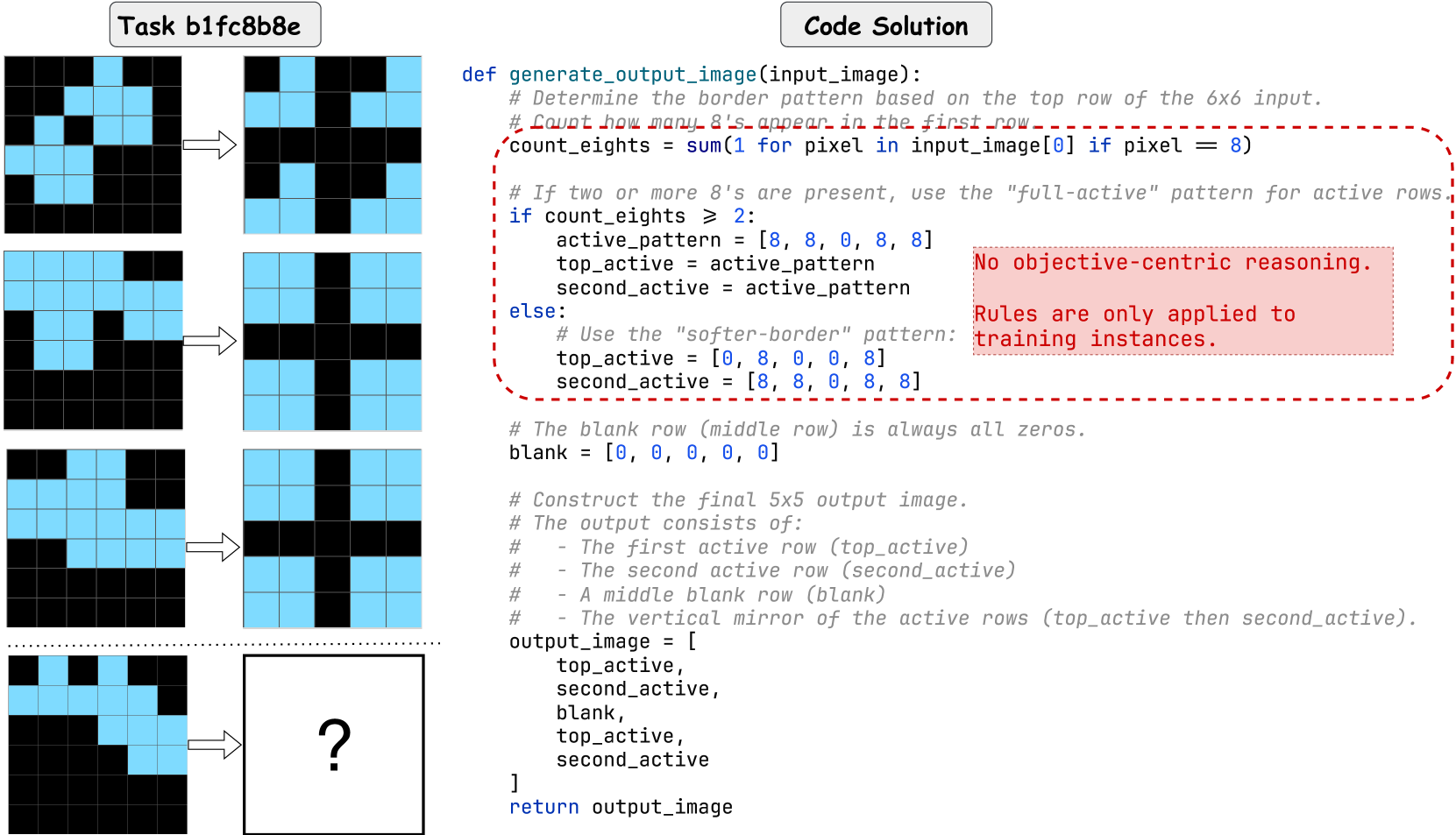
The image presents a task (b1fc8b8e) involving the transformation of 6x6 pixel grids into 5x5 pixel grids, guided by a provided Python code snippet. The left side of the image shows three examples of input 6x6 grids and their corresponding output 5x5 grids. The bottom-left shows an input 6x6 grid with a question mark indicating the desired output. The right side of the image shows the code solution that defines the transformation logic.
### Components/Axes
* **Task Identifier:** "Task b1fc8b8e" (located at the top-left)
* **Code Solution:** A Python code snippet titled "Code Solution" (located at the top-right)
* **Input/Output Grids:** 6x6 input grids on the left, transformed into 5x5 output grids on the right. The grids use two colors: light blue and black.
* **Transformation Arrows:** Arrows pointing from the input grids to the output grids, indicating the transformation process.
### Detailed Analysis or ### Content Details
**1. Input/Output Grid Examples:**
* **Example 1:**
* Input (6x6): Top row has 3 light blue pixels.
* Output (5x5): A cross pattern with light blue pixels.
* **Example 2:**
* Input (6x6): Top row has 5 light blue pixels.
* Output (5x5): A cross pattern with light blue pixels.
* **Example 3:**
* Input (6x6): Top row has 2 light blue pixels.
* Output (5x5): A cross pattern with light blue pixels.
* **Example 4 (Incomplete):**
* Input (6x6): Top row has 3 light blue pixels.
* Output (5x5): Marked with a question mark, indicating the desired output.
**2. Code Solution:**
The Python code defines a function `generate_output_image(input_image)` that transforms a 6x6 input image into a 5x5 output image. The code logic is as follows:
* **Determine Border Pattern:** The code determines the border pattern based on the top row of the 6x6 input image.
* **Count '8's:** It counts how many '8's appear in the first row of the input image. `count_eights = sum(1 for pixel in input_image[0] if pixel == 8)`
* **Conditional Logic:**
* If `count_eights >= 2`: It uses the "full-active" pattern for active rows.
* `active_pattern = [8, 8, 0, 8, 8]`
* `top_active = active_pattern`
* `second_active = active_pattern`
* Else: It uses the "softer-border" pattern.
* `top_active = [0, 8, 0, 0, 8]`
* `second_active = [8, 8, 0, 8, 8]`
* **Blank Row:** Defines a blank row (middle row) as all zeros. `blank = [0, 0, 0, 0, 0]`
* **Construct Output Image:** The final 5x5 output image consists of:
* The first active row (`top_active`)
* The second active row (`second_active`)
* A middle blank row (`blank`)
* The vertical mirror of the active rows (top\_active then second\_active).
* **Output:** The function returns the `output_image`.
**3. Annotation:**
A red box surrounds a portion of the code with the following text:
* "No objective-centric reasoning."
* "Rules are only applied to training instances."
### Key Observations
* The code solution transforms a 6x6 input grid into a 5x5 output grid based on the number of light blue pixels (represented as '8' in the code) in the top row of the input.
* If the count of light blue pixels is greater than or equal to 2, a "full-active" pattern is used. Otherwise, a "softer-border" pattern is used.
* The output image is constructed by combining active rows, a blank row, and a mirrored version of the active rows.
* The annotation suggests that the rules are specifically designed for the training instances and may not generalize well to other scenarios.
### Interpretation
The image presents a task where a pixel grid transformation is performed based on a set of rules defined in the provided code. The code solution uses a simple heuristic (counting light blue pixels in the top row) to determine the output pattern. The annotation highlights a potential limitation of this approach, suggesting that the rules are tailored to the training data and may not be robust or generalizable. The task likely aims to assess the ability to understand and apply the given code logic to predict the output for a new input grid.
For the incomplete example, the top row has 3 light blue pixels, so the "full-active" pattern will be used. The output should be:
```
[8, 8, 0, 8, 8]
[8, 8, 0, 8, 8]
[0, 0, 0, 0, 0]
[8, 8, 0, 8, 8]
[8, 8, 0, 8, 8]
```
This corresponds to a light blue cross pattern.