## Diagram: NN Framework Conversion Pipeline
### Overview
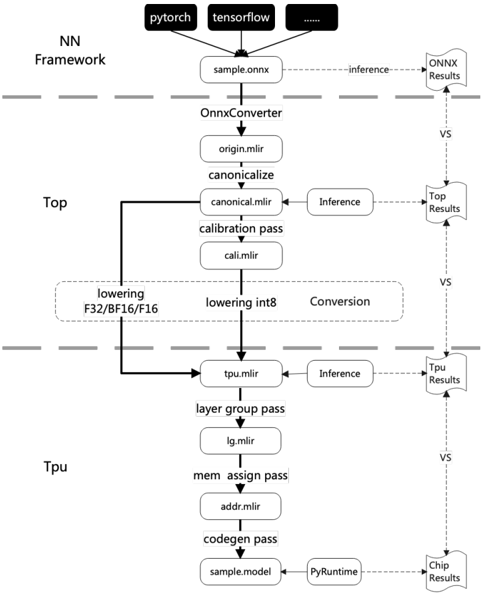
The image is a flowchart illustrating the conversion pipeline of a neural network (NN) framework, starting from frameworks like PyTorch and TensorFlow, processing through ONNX conversion, and then optimizing for a TPU. The diagram shows the flow of data and processes, including lowering, inference, and conversion steps, with intermediate results being compared at various stages.
### Components/Axes
* **Header:** Contains the input frameworks (PyTorch, TensorFlow, and others represented by "...").
* **NN Framework:** Label indicating the initial stage of the pipeline.
* **Top:** Label indicating the intermediate stage of the pipeline.
* **Tpu:** Label indicating the final stage of the pipeline.
* **Nodes:** Rectangular boxes represent processes or data formats (e.g., "sample.onnx", "OnnxConverter", "origin.mlir").
* **Arrows:** Indicate the flow of data or control between processes. Solid arrows represent primary flow, dashed arrows represent inference or comparison.
* **Inference:** Dashed arrows labeled "inference" indicate inference processes.
* **VS:** Label indicating a comparison between the results of the main flow and the inference results.
* **Results:** Dashed arrows labeled "ONNX Results", "Top Results", "Tpu Results", and "Chip Results" indicate the results of the inference processes at different stages.
### Detailed Analysis
1. **Input Frameworks:**
* "pytorch" (top-left)
* "tensorflow" (top-center)
* "..." (top-right, indicating other frameworks)
2. **Initial Conversion:**
* "sample.onnx" (directly below the input frameworks)
* "OnnxConverter" (below "sample.onnx")
* "origin.mlir" (below "OnnxConverter")
* "canonicalize" (below "origin.mlir")
* "canonical.mlir" (below "canonicalize")
* "calibration pass" (below "canonical.mlir")
* "cali.mlir" (below "calibration pass")
3. **Lowering and Conversion:**
* "lowering F32/BF16/F16" (left side, in a rounded box)
* "lowering int8" (right side, in a rounded box)
* "Conversion" (right side, in a rounded box)
4. **TPU Optimization:**
* "tpu.mlir" (below the lowering/conversion stage)
* "layer group pass" (below "tpu.mlir")
* "lg.mlir" (below "layer group pass")
* "mem assign pass" (below "lg.mlir")
* "addr.mlir" (below "mem assign pass")
* "codegen pass" (below "addr.mlir")
* "sample.model" (below "codegen pass")
* "PyRuntime" (to the right of "sample.model")
5. **Inference and Comparison:**
* Dashed arrows labeled "inference" branch off from "sample.onnx", "canonical.mlir", and "tpu.mlir".
* Dashed arrows labeled "ONNX Results", "Top Results", "Tpu Results", and "Chip Results" indicate the results of the inference processes at different stages.
* "VS" labels indicate a comparison between the results of the main flow and the inference results.
### Key Observations
* The diagram illustrates a multi-stage conversion and optimization process for neural networks.
* The process involves converting models from different frameworks to ONNX format, then optimizing them for TPU deployment.
* Inference is performed at multiple stages, and the results are compared to the main flow to ensure accuracy.
* The diagram highlights the different passes and transformations applied to the model during the conversion process.
### Interpretation
The diagram depicts a typical workflow for deploying neural networks on TPUs. It starts with models defined in popular frameworks like PyTorch and TensorFlow. These models are first converted to the ONNX (Open Neural Network Exchange) format, which acts as an intermediary representation. The ONNX model then undergoes a series of optimization and transformation steps, including canonicalization, calibration, and lowering to specific data types (F32, BF16, F16, and int8). These steps are crucial for improving performance and reducing memory footprint on the TPU. The "inference" branches and "VS" comparisons suggest a validation process where the accuracy of the transformed model is checked against the original model at different stages. The final "sample.model" represents the optimized model ready for deployment on the TPU, using a PyRuntime environment. The entire process aims to leverage the specialized hardware capabilities of TPUs for efficient neural network execution.