## Diagram: Prompt Template and Error Analysis Flow
### Overview
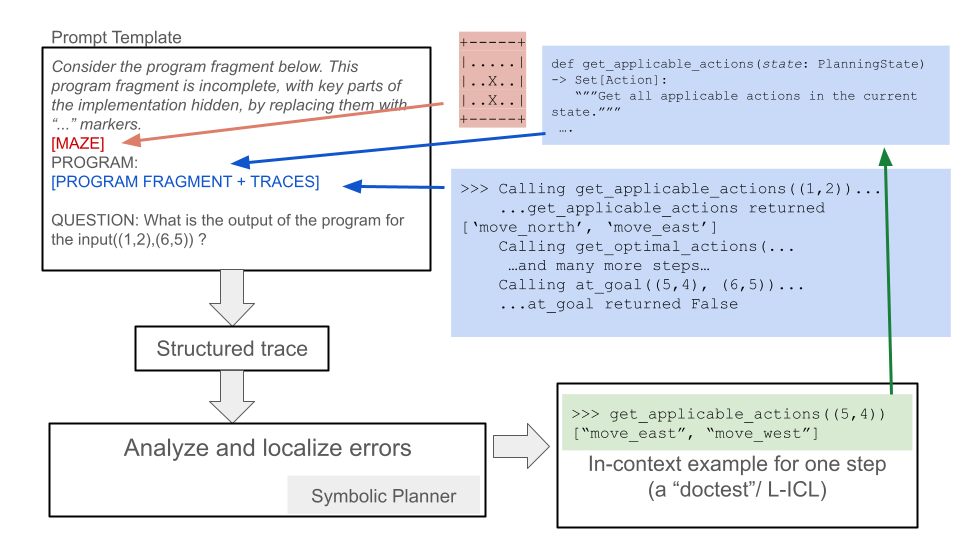
The image presents a diagram illustrating a prompt template used in conjunction with program analysis and error localization. It outlines the process of using a program fragment with hidden implementation details, tracing its execution, and analyzing the results to identify errors. The diagram includes code snippets, example calls, and a symbolic planner component.
### Components/Axes
The diagram consists of the following components:
1. **Prompt Template (Top-Left)**:
* Text: "Prompt Template"
* Text: "Consider the program fragment below. This program fragment is incomplete, with key parts of the implementation hidden, by replacing them with "..." markers."
* Label: "[MAZE]" (connected by a red arrow to a maze representation)
* Label: "PROGRAM: [PROGRAM FRAGMENT + TRACES]" (connected by a blue arrow to program execution traces)
* Text: "QUESTION: What is the output of the program for the input((1,2),(6,5)) ?"
2. **Maze Representation (Top-Center)**:
* A grid-like structure with "..." and "X" characters.
* Appears to represent a maze or grid-based environment.
* The grid contains the following elements:
* `+` characters at the corners.
* `-` characters forming the top and bottom borders.
* `|` characters forming the left and right borders.
* `.` and `X` characters within the grid.
* The grid appears to be 3 rows by 5 columns.
* Row 1: `...+...`
* Row 2: `|.X.X.|`
* Row 3: `|.X.X.|`
* Row 4: `...+...`
3. **Code Snippet (Top-Right)**:
* `def get_applicable_actions(state: PlanningState) -> Set[Action]:`
* `"""Get all applicable actions in the current state."""`
4. **Execution Traces (Center-Right)**:
* `>>> Calling get_applicable_actions((1,2))...`
* `...get_applicable_actions returned ['move_north', 'move_east']`
* `Calling get_optimal_actions(...`
* `...and many more steps...`
* `Calling at_goal((5,4), (6,5))...`
* `...at_goal returned False`
5. **"Structured trace" (Center)**:
* A rectangular box with the text "Structured trace" inside.
* Connected by a downward arrow from the "Prompt Template" box.
6. **"Analyze and localize errors" (Bottom-Left)**:
* A rectangular box with the text "Analyze and localize errors" inside.
* Connected by a downward arrow from the "Structured trace" box.
* "Symbolic Planner" is written below the box.
7. **In-context Example (Bottom-Right)**:
* `>>> get_applicable_actions((5,4))`
* `["move_east", "move_west"]`
* `In-context example for one step (a "doctest"/ L-ICL)`
### Detailed Analysis or ### Content Details
* **Prompt Template**: The prompt template defines the structure of the input provided to the system. It includes a program fragment with missing parts (indicated by "..." markers), a maze representation, and a question about the program's output for a given input.
* **Maze Representation**: The maze representation provides a context or environment for the program to operate within. The 'X' characters likely represent obstacles or walls.
* **Code Snippet**: The code snippet defines a function `get_applicable_actions` that takes a `PlanningState` as input and returns a set of possible actions.
* **Execution Traces**: The execution traces show the sequence of function calls and return values during the program's execution. It includes calls to `get_applicable_actions` and `at_goal`, along with intermediate steps.
* **Structured Trace**: This represents the structured representation of the program's execution, which is used for error analysis.
* **Analyze and localize errors**: This step involves analyzing the structured trace to identify and locate errors in the program.
* **Symbolic Planner**: The symbolic planner is a component used to reason about the program's behavior and identify potential errors.
* **In-context Example**: This provides a specific example of how the `get_applicable_actions` function is used in a particular state.
### Key Observations
* The diagram illustrates a process for analyzing and localizing errors in a program by using a prompt template, tracing the program's execution, and analyzing the results.
* The maze representation provides a context for the program to operate within.
* The execution traces show the sequence of function calls and return values during the program's execution.
* The symbolic planner is used to reason about the program's behavior and identify potential errors.
### Interpretation
The diagram describes a system for automated program debugging. The "Prompt Template" provides a structured input to the system, including a program fragment, a maze environment, and a question. The system then executes the program fragment, generating "Traces" of its execution. These traces are converted into a "Structured Trace," which is then analyzed to "localize errors." The "Symbolic Planner" likely uses symbolic execution or other formal methods to reason about the program's behavior and identify discrepancies between the expected and actual behavior. The "In-context example" provides a concrete illustration of how the `get_applicable_actions` function works, which can be used to guide the error localization process. The overall goal is to automate the process of finding and fixing bugs in programs.