## Diagram: Multi-Task Robotics System Architecture
### Overview
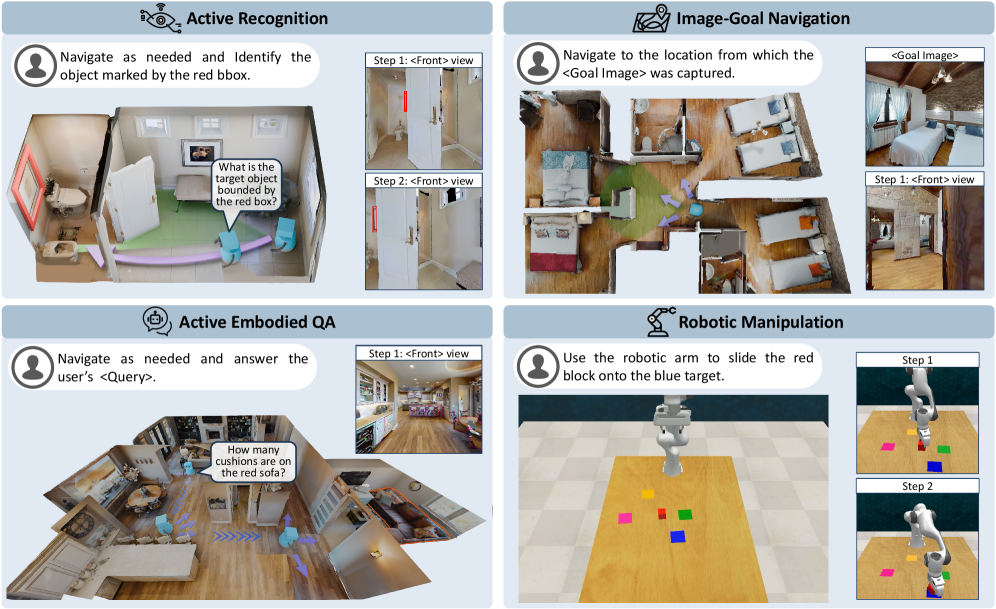
The image depicts a 2x2 grid of diagrams illustrating four distinct robotics tasks: **Active Recognition**, **Image-Goal Navigation**, **Active Embodied QA**, and **Robotic Manipulation**. Each quadrant includes textual instructions, visual steps, and spatial reasoning elements.
### Components/Axes
#### Active Recognition (Top-Left)
- **Task Label**: "Active Recognition" with a speech bubble icon.
- **Instruction**: "Navigate as needed and Identify the object marked by the red bbox."
- **Speech Bubble**: "What is the target object bounded by the red box?"
- **Steps**:
- Step 1: `<Front> view` (image of a door with a red bounding box).
- Step 2: `<Front> view` (image of a room with a red bounding box).
- **Visuals**: 3D room model with a red bounding box highlighting a target object.
#### Image-Goal Navigation (Top-Right)
- **Task Label**: "Image-Goal Navigation" with a map icon.
- **Instruction**: "Navigate to the location from which the <Goal Image> was captured."
- **Steps**:
- Step 1: `<Front> view` (image of a room with a green arrow pointing to a target location).
- Goal Image: Bedroom scene with two beds.
- **Visuals**: 3D room model with a green arrow indicating the goal location.
#### Active Embodied QA (Bottom-Left)
- **Task Label**: "Active Embodied QA" with a speech bubble icon.
- **Instruction**: "Navigate as needed and answer the user’s <Query>."
- **Speech Bubble**: "How many cushions are on the red sofa?"
- **Steps**:
- Step 1: `<Front> view` (image of a kitchen with a red sofa).
- **Visuals**: 3D room model with a red sofa and blue arrows indicating movement.
#### Robotic Manipulation (Bottom-Right)
- **Task Label**: "Robotic Manipulation" with a robotic arm icon.
- **Instruction**: "Use the robotic arm to slide the red block onto the blue target."
- **Steps**:
- Step 1: Robot arm approaching red block.
- Step 2: Robot arm placing red block on blue target.
- **Visuals**: Grid with colored blocks (red, yellow, green, blue) and a robotic arm.
### Detailed Analysis
- **Textual Elements**:
- All tasks include explicit instructions and step-by-step visuals.
- Speech bubbles and step labels (e.g., `<Front> view`) are consistently used across quadrants.
- Color-coded elements (red bounding boxes, green arrows, blue arrows) denote targets or actions.
- **Spatial Grounding**:
- Red bounding boxes in Active Recognition and Active Embodied QA highlight objects of interest.
- Green arrows in Image-Goal Navigation indicate goal locations.
- Blue arrows in Active Embodied QA suggest movement paths.
- Robotic Manipulation uses colored blocks (red, blue) to denote objects and targets.
### Key Observations
1. **Task Consistency**: Each quadrant follows a structured format: task label, instruction, steps, and visuals.
2. **Color Coding**: Red is used for target objects (bounding boxes, blocks), green for navigation goals, and blue for movement paths.
3. **Step Progression**: Steps 1 and 2 in each quadrant show incremental actions (e.g., identifying objects, navigating, manipulating).
### Interpretation
The diagram illustrates a modular robotics system capable of:
1. **Object Recognition**: Identifying targets via bounding boxes.
2. **Goal Navigation**: Using visual cues (arrows, images) to reach locations.
3. **Question Answering**: Answering spatial queries (e.g., counting objects).
4. **Robotic Action**: Executing precise manipulations (e.g., sliding blocks).
The system emphasizes **active perception** (navigation, recognition) and **embodied interaction** (QA, manipulation), suggesting integration of computer vision, spatial reasoning, and robotic control. The use of color-coded visuals and step-by-step instructions implies a focus on human-robot collaboration, where users guide robots through tasks using intuitive cues.
No numerical data or charts are present; the image focuses on task descriptions and spatial relationships.