## File Directory Structure: Python Project "sample_simple_math_lib"
### Overview
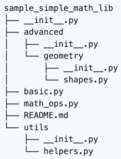
The image displays a hierarchical file directory structure for a Python project named `sample_simple_math_lib`. It is a textual representation, likely a screenshot from a code editor's file explorer or a terminal listing, showing the organization of source code files and folders.
### Components/Axes
The structure is presented as an indented tree, where indentation signifies nesting within parent directories. There are no axes, legends, or numerical data points. The primary components are folder names (ending with `/`), Python source files (`.py`), and a Markdown file (`.md`).
### Detailed Analysis
The directory tree is rooted at `sample_simple_math_lib/`. The full structure, transcribed precisely with indentation levels, is as follows:
```
sample_simple_math_lib/
├── advanced/
│ ├── __init__.py
│ ├── geometry/
│ │ ├── __init__.py
│ │ └── shapes.py
│ └── __init__.py
├── basic.py
├── math_ops.py
├── README.md
└── utils/
├── __init__.py
└── helpers.py
```
**Breakdown of Elements:**
* **Root Directory:** `sample_simple_math_lib/`
* **Subdirectories:**
* `advanced/`: Contains modules for more complex mathematical operations.
* `geometry/`: A sub-package within `advanced`.
* `utils/`: Contains utility or helper modules.
* **Python Files:**
* `__init__.py`: Present in `advanced/`, `advanced/geometry/`, and `utils/`. These files mark the directories as Python packages, allowing their modules to be imported.
* `shapes.py`: Located within `advanced/geometry/`. Likely contains classes or functions related to geometric shapes.
* `basic.py`: Located at the project root. Likely contains fundamental mathematical functions.
* `math_ops.py`: Located at the project root. Likely contains core mathematical operations.
* `helpers.py`: Located within `utils/`. Likely contains auxiliary functions used by other modules.
* **Documentation:**
* `README.md`: A Markdown file at the project root, typically containing project description, installation, and usage instructions.
### Key Observations
1. **Package Structure:** The project is organized as a proper Python package hierarchy, using `__init__.py` files to define importable packages (`advanced`, `advanced.geometry`, `utils`).
2. **Modular Design:** Functionality is separated into distinct modules based on domain: `basic.py`, `math_ops.py`, `advanced/geometry/shapes.py`, and `utils/helpers.py`.
3. **Clear Hierarchy:** There is a logical separation between basic operations (`basic.py`, `math_ops.py`), advanced specialized operations (`advanced/`), and shared utilities (`utils/`).
### Interpretation
This directory structure represents a well-organized, modular Python library for mathematical computations. The design follows common software engineering practices for creating maintainable and scalable code.
* **What it suggests:** The library is likely intended to be imported as a whole (`import sample_simple_math_lib`) or in parts (e.g., `from sample_simple_math_lib.advanced.geometry import shapes`). The separation implies that `basic.py` and `math_ops.py` contain the core, frequently used functions, while `advanced/` houses more specialized, possibly dependent, functionality. The `utils/` package centralizes common helper code to avoid duplication.
* **Relationships:** Modules in `advanced/` and at the root level may import from `utils/helpers.py`. The `geometry/shapes.py` module is a specialized component within the broader `advanced` package.
* **Notable Pattern:** The presence of `__init__.py` in the `advanced/` directory *and* within its `geometry/` subdirectory indicates a nested package structure, allowing for imports like `from sample_simple_math_lib.advanced import geometry` or `from sample_simple_math_lib.advanced.geometry.shapes import Shape`. This is a standard pattern for organizing larger Python projects.