\n
## Diagram: Image Processing Steps
### Overview
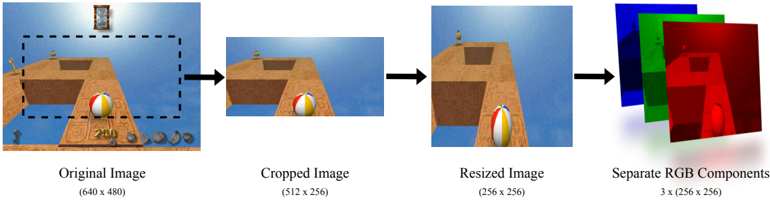
This diagram illustrates a sequence of image processing steps applied to an original image. The steps include cropping, resizing, and separating the image into its Red, Green, and Blue (RGB) color components. The diagram shows the visual result of each step.
### Components/Axes
The diagram consists of four panels, arranged horizontally from left to right. Each panel is labeled with the name of the processing step and the resulting image dimensions.
* **Original Image:** (640 x 480)
* **Cropped Image:** (512 x 256)
* **Resized Image:** (256 x 256)
* **Separate RGB Components:** 3 x (256 x 256)
The original image contains a beach scene with a ball, a small structure, and a dashed rectangle indicating the cropping area. A number "240" is visible in the bottom-left corner of the original image.
### Detailed Analysis or Content Details
1. **Original Image:** The image depicts a beach scene with a blue sky and water. A striped beach ball is prominently featured. A small, yellow structure is visible in the upper portion of the image. A dashed white rectangle outlines the area that will be cropped in the next step. The number "240" is present in the bottom-left corner.
2. **Cropped Image:** This image shows the portion of the original image within the dashed rectangle. The dimensions are 512 x 256 pixels. The beach ball and the yellow structure are still visible.
3. **Resized Image:** The cropped image has been resized to 256 x 256 pixels. The beach ball is now more centrally located.
4. **Separate RGB Components:** This panel displays three separate images, each representing one of the RGB color channels.
* **Red Component:** Shows the image with only red color information. The beach ball appears as a bright area.
* **Green Component:** Shows the image with only green color information. The beach and some parts of the ball are visible.
* **Blue Component:** Shows the image with only blue color information. The sky and water are visible.
### Key Observations
* The cropping step reduces the image size from 640x480 to 512x256.
* The resizing step further reduces the image size to 256x256.
* Separating the image into RGB components allows for individual analysis of each color channel.
* The number "240" in the original image is not present in the subsequent images, suggesting it was within the cropped area.
### Interpretation
This diagram demonstrates a basic image processing pipeline. The steps shown are common preprocessing techniques used in computer vision and image analysis. Cropping isolates a region of interest, resizing reduces computational complexity, and separating into RGB components allows for color-based analysis or manipulation. The diagram effectively illustrates how an image can be transformed through these operations. The presence of the number "240" in the original image, and its subsequent disappearance, suggests it was a metadata element or annotation that was removed during the cropping process.