# Technical Document Extraction: Flowchart Analysis
## Overview
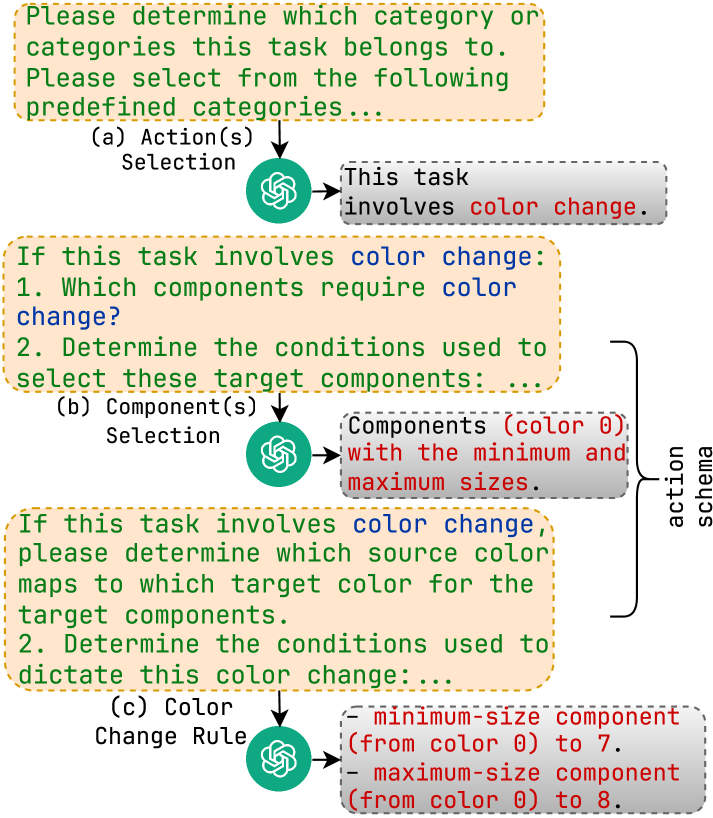
The image is a **flowchart** outlining a decision-making process for categorizing tasks involving **color change**. It is structured into three sequential sections: **Action(s)**, **Component(s)**, and **Color Change Rule**. Each section contains conditional logic, selection criteria, and example data points.
---
## Section 1: Action(s) Selection
### Labels and Text
- **Header**:
`"Please determine which category or categories this task belongs to. Please select from the following predefined categories..."`
- **Question**:
`"If this task involves color change:"`
- **Selection**:
- **Yes/No** (implied via branching logic).
- **Example Output**:
`"This task involves color change."`
### Spatial Grounding
- Positioned at the **top** of the flowchart.
- Arrows direct to the next section if "Yes" is selected.
---
## Section 2: Component(s) Selection
### Labels and Text
- **Header**:
`"If this task involves color change:"`
- **Sub-questions**:
1. `"Which components require color change?"`
2. `"Determine the conditions used to select these target components:"`
- **Example Output**:
`"Components (color 0) with the minimum and maximum sizes."`
- **Selection**:
- **Component Type**: Color 0.
- **Size Constraints**:
- Minimum size: 7.
- Maximum size: 8.
### Spatial Grounding
- Positioned **below** the Action(s) section.
- Arrows connect to the Color Change Rule section.
---
## Section 3: Color Change Rule
### Labels and Text
- **Header**:
`"If this task involves color change, please determine which source color maps to which target color for the target components."`
- **Sub-questions**:
1. `"Determine the conditions used to dictate this color change:"`
- **Example Output**:
- `"minimum-size component (from color 0) to 7."`
- `"maximum-size component (from color 0) to 8."`
### Spatial Grounding
- Positioned **at the bottom** of the flowchart.
- Arrows originate from the Component(s) section.
---
## Key Trends and Data Points
1. **Color Change Logic**:
- Tasks involving color change require identifying **target components** (e.g., "color 0") and their **size constraints** (e.g., 7–8).
- Source and target color mappings are explicitly defined (e.g., "from color 0 to 7").
2. **Component Constraints**:
- Components are categorized by **color** and **size**, with explicit minimum/maximum values.
3. **Flowchart Structure**:
- Sequential decision-making:
`Action(s) → Component(s) → Color Change Rule`.
---
## Diagram Components and Flow
1. **Action(s) Node**:
- **Icon**: Green circle with a white flower-like symbol.
- **Purpose**: Initial task categorization.
2. **Component(s) Node**:
- **Icon**: Green circle with a white flower-like symbol.
- **Purpose**: Identify components requiring color change and their size constraints.
3. **Color Change Rule Node**:
- **Icon**: Green circle with a white flower-like symbol.
- **Purpose**: Define source-to-target color mappings and size-based conditions.
---
## Notes
- **No numerical data table** is present; the flowchart relies on textual conditions and examples.
- **No heatmap or chart** is included; the focus is on decision logic.
- **All text is in English**; no other languages are present.
---
## Final Output
The flowchart provides a structured framework for categorizing tasks involving color change, emphasizing component selection and color mapping rules. It uses conditional logic and explicit examples to guide users through the process.