## Configuration Interface: Trinity-RFT Config Generator
### Overview
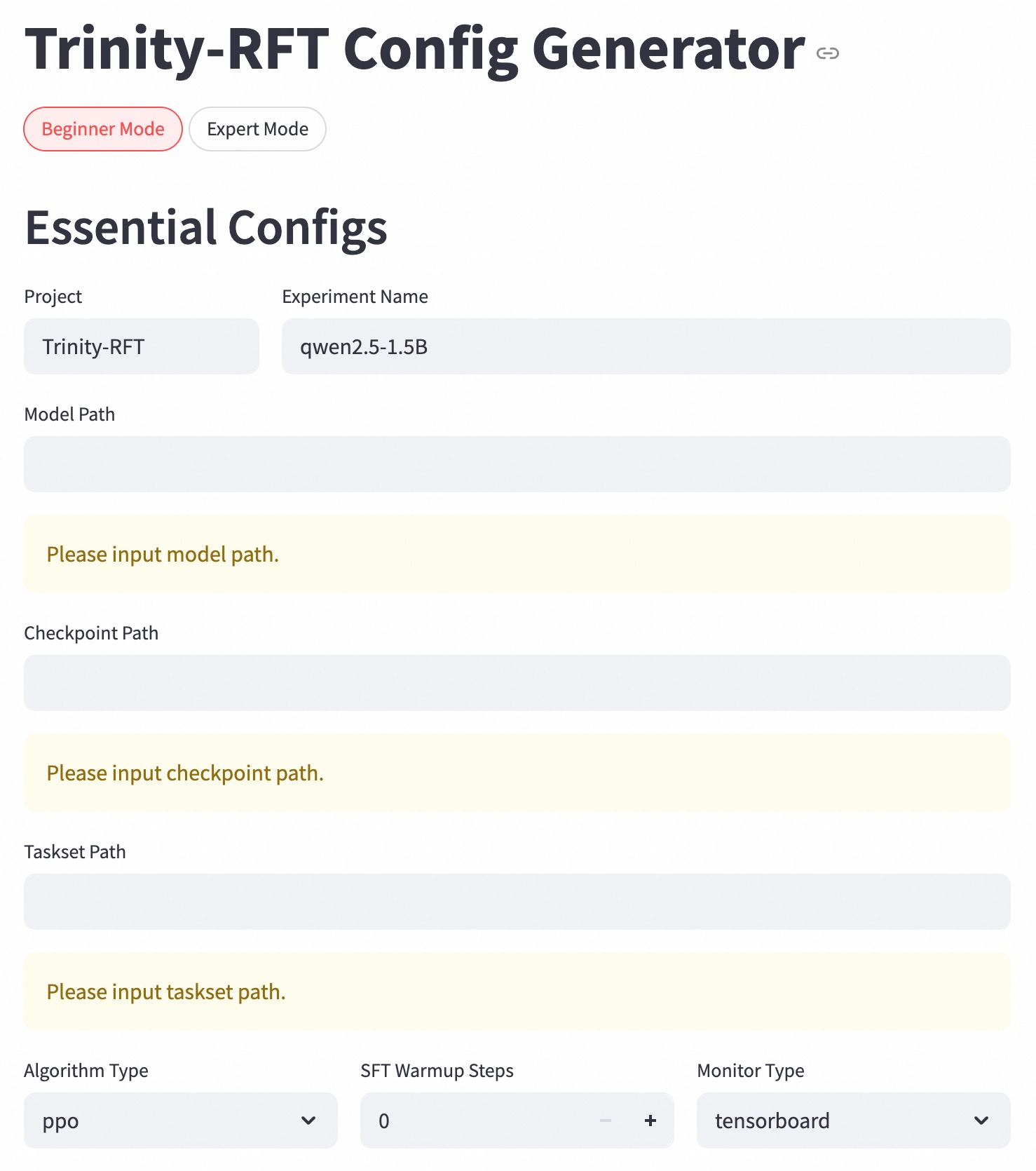
The image depicts a configuration interface for the "Trinity-RFT Config Generator." It presents a form-like layout for specifying essential configurations, including project details, file paths, algorithm settings, and monitoring options. The interface offers both "Beginner Mode" and "Expert Mode" options.
### Components/Axes
* **Header:** "Trinity-RFT Config Generator" with a link icon.
* **Mode Selection:** "Beginner Mode" (selected) and "Expert Mode" buttons.
* **Section Title:** "Essential Configs"
* **Input Fields:**
* Project: Text field populated with "Trinity-RFT"
* Experiment Name: Text field populated with "qwen2.5-1.5B"
* Model Path: Text field with placeholder text "Please input model path."
* Checkpoint Path: Text field with placeholder text "Please input checkpoint path."
* Taskset Path: Text field with placeholder text "Please input taskset path."
* **Dropdown Menus:**
* Algorithm Type: Dropdown menu set to "ppo"
* Monitor Type: Dropdown menu set to "tensorboard"
* **Numerical Input:**
* SFT Warmup Steps: Numerical input field set to "0" with increment (+) and decrement (-) buttons.
### Detailed Analysis or ### Content Details
The interface is designed for configuring a Trinity-RFT project. The user can specify the project name, experiment name, and paths to the model, checkpoint, and taskset files. The algorithm type and monitor type can be selected from dropdown menus. The number of SFT Warmup Steps can be adjusted using the increment and decrement buttons.
* **Project:** "Trinity-RFT"
* **Experiment Name:** "qwen2.5-1.5B"
* **Model Path:** Empty, prompting "Please input model path."
* **Checkpoint Path:** Empty, prompting "Please input checkpoint path."
* **Taskset Path:** Empty, prompting "Please input taskset path."
* **Algorithm Type:** "ppo"
* **SFT Warmup Steps:** "0"
* **Monitor Type:** "tensorboard"
### Key Observations
* The "Beginner Mode" is currently selected.
* The Model Path, Checkpoint Path, and Taskset Path fields are empty and require user input.
* The Algorithm Type is set to "ppo" and the Monitor Type is set to "tensorboard."
* The SFT Warmup Steps are set to "0."
### Interpretation
The configuration interface allows users to set up and customize their Trinity-RFT experiments. The "Beginner Mode" suggests a simplified configuration process, while the "Expert Mode" likely offers more advanced options. The interface guides the user through the essential configurations, ensuring that all necessary parameters are specified before running the experiment. The empty path fields indicate that the user needs to provide the locations of the model, checkpoint, and taskset files.