## Screenshot: Trinity-RFT Config Generator Interface
### Overview
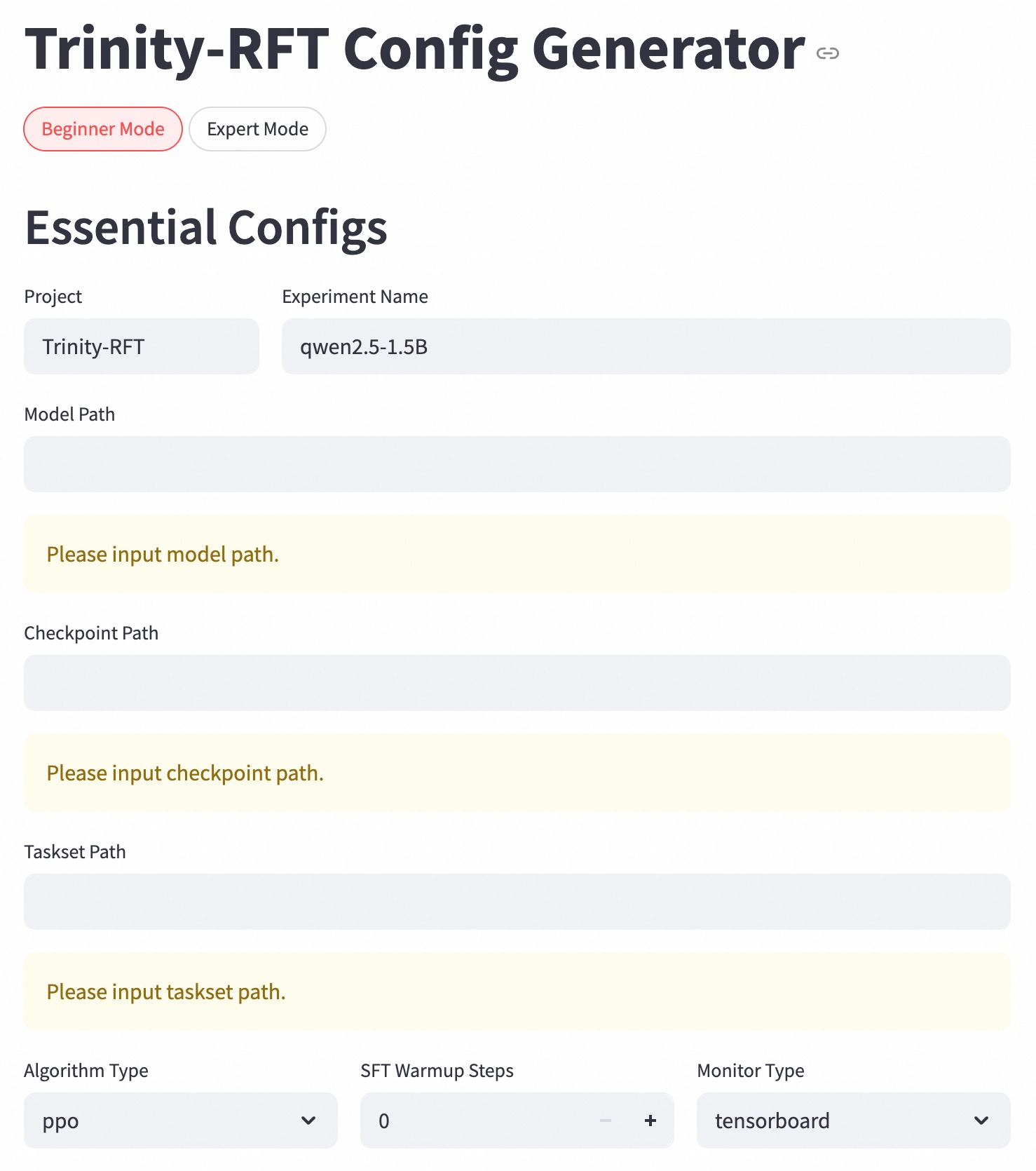
The image is a screenshot of a web-based configuration interface titled "Trinity-RFT Config Generator." It appears to be a tool for setting up parameters for a machine learning or AI training process, specifically for a project named "Trinity-RFT." The interface is in "Beginner Mode" and displays a form with several required and optional configuration fields.
### Components/Axes
The interface is structured as a vertical form with the following labeled sections and input elements:
1. **Header Section:**
* **Title:** "Trinity-RFT Config Generator" (Top-left, large bold font). A small link/chain icon is present to the right of the title.
* **Mode Toggle:** Two buttons below the title.
* "Beginner Mode" (Left button, active state with a red border and red text).
* "Expert Mode" (Right button, inactive state with a grey border and black text).
2. **Essential Configs Section:**
* **Section Header:** "Essential Configs" (Left-aligned, bold).
* **Form Fields (in order from top to bottom):**
* **Project:** Label "Project" above a text input field containing the value `Trinity-RFT`.
* **Experiment Name:** Label "Experiment Name" above a text input field containing the value `qwen2.5-1.5B`.
* **Model Path:** Label "Model Path" above an empty text input field. Below it, a yellow-highlighted placeholder message reads: "Please input model path."
* **Checkpoint Path:** Label "Checkpoint Path" above an empty text input field. Below it, a yellow-highlighted placeholder message reads: "Please input checkpoint path."
* **Taskset Path:** Label "Taskset Path" above an empty text input field. Below it, a yellow-highlighted placeholder message reads: "Please input taskset path."
* **Algorithm Type:** Label "Algorithm Type" above a dropdown menu currently set to `ppo`.
* **SFT Warmup Steps:** Label "SFT Warmup Steps" above a numeric input field set to `0`, with decrement (`-`) and increment (`+`) buttons.
* **Monitor Type:** Label "Monitor Type" above a dropdown menu currently set to `tensorboard`.
### Detailed Analysis
* **Form State:** The form is partially filled. The "Project" and "Experiment Name" fields have been populated. The three path fields ("Model Path," "Checkpoint Path," "Taskset Path") are empty and display validation/placeholder messages indicating they are required.
* **Default/Selected Values:**
* Algorithm Type: `ppo` (Proximal Policy Optimization, a common reinforcement learning algorithm).
* SFT Warmup Steps: `0` (SFT likely stands for Supervised Fine-Tuning).
* Monitor Type: `tensorboard` (A popular visualization toolkit for machine learning).
* **Layout:** The layout is a single-column, left-aligned form. Labels are positioned directly above their corresponding input fields. The placeholder messages for empty required fields are visually distinct with a light yellow background.
### Key Observations
1. **Active Mode:** The interface is currently in "Beginner Mode," which likely simplifies the available configuration options compared to "Expert Mode."
2. **Required Fields:** The three path fields are mandatory, as indicated by the persistent placeholder messages.
3. **Technical Context:** The field names and values (`Trinity-RFT`, `qwen2.5-1.5B`, `ppo`, `SFT`, `tensorboard`) strongly suggest this is a configuration generator for a Reinforcement Learning from Human Feedback (RLHF) or similar fine-tuning pipeline for a large language model (the experiment name references "qwen2.5-1.5B," which is likely a 1.5-billion parameter model from the Qwen series).
4. **UI Design:** The design is clean and functional, using a light theme with clear typography and subtle color cues (red for active mode, yellow for required field warnings).
### Interpretation
This image captures the initial state of a configuration workflow for an AI model training or fine-tuning job. The user is expected to provide critical file system paths (to the base model, a checkpoint, and a task dataset) before generating a valid configuration file. The pre-filled values for algorithm, warmup steps, and monitoring tool represent sensible defaults for a beginner-level setup. The existence of an "Expert Mode" implies that more granular hyperparameters and advanced settings are available but hidden to reduce complexity for new users. The tool's purpose is to abstract away the complexity of writing configuration files manually, reducing errors and streamlining the setup process for the "Trinity-RFT" framework.