## Photograph: Humanoid Robot with Objects on Table
### Overview
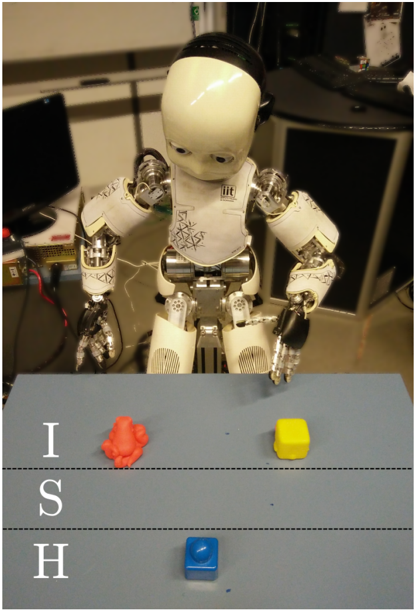
The image is a photograph depicting a small, white humanoid robot standing behind a light blue table. On the table are three distinct objects. The scene appears to be set in a laboratory or workshop environment. A vertical text overlay is present on the left side of the image.
### Components & Spatial Layout
**1. Primary Subject (Robot):**
* **Position:** Centered in the upper half of the frame, behind the table.
* **Description:** A child-sized humanoid robot with a white plastic head and torso. The head has large, dark, circular eye sensors. The torso features visible mechanical joints, wiring, and some black markings or signatures on the chest plate. The arms are articulated with metallic, skeletal hands. The lower body consists of mechanical legs. The robot's posture is slightly hunched, with its head tilted downward, appearing to look at the objects on the table.
**2. Table and Objects:**
* **Table:** A flat, light blue surface occupying the lower half of the image. Two faint, horizontal dashed lines are visible across its width.
* **Object 1 (Top Left):** An irregularly shaped, orange object. Its form is organic and non-geometric, resembling a crumpled piece of material or a 3D-printed abstract shape.
* **Object 2 (Top Right):** A bright yellow cube. It appears to be a standard, solid block.
* **Object 3 (Bottom Center):** A bright blue cube, similar in size to the yellow one. It is positioned closer to the viewer, below the dashed lines.
**3. Text Overlay:**
* **Content:** The capital letters "I", "S", and "H" are stacked vertically.
* **Language:** English.
* **Position:** Located in the bottom-left quadrant of the image, superimposed over the blue table surface. The letters are white with a slight shadow or outline for contrast.
* **Transcription:** `I` (top), `S` (middle), `H` (bottom).
**4. Background Environment:**
* **Left Background:** A dark computer monitor (off or displaying black) on a desk. Various cables and a power strip are visible.
* **Right Background:** A dark cabinet or piece of equipment. On top of it sits a white box or container with some indistinct markings.
* **General Setting:** The background is slightly out of focus, suggesting a shallow depth of field focused on the robot and table. The lighting is artificial and functional.
### Detailed Analysis
* **Robot's Focus:** The robot's head orientation and eye sensors are directed downward toward the area of the table where the orange and yellow objects are placed.
* **Object Arrangement:** The objects are placed in a triangular formation. The orange and yellow objects are in the "workspace" area above the dashed lines, while the blue object is in a separate zone below the lines.
* **Color Palette:** The scene is dominated by the white of the robot, the light blue of the table, and the primary colors (orange, yellow, blue) of the objects, creating a high-contrast setup likely for visual recognition tasks.
### Key Observations
1. The robot is a physical, articulated machine, not a digital rendering.
2. The objects are simple, distinct in color and shape (one irregular, two cubic), which is typical for robotics manipulation or computer vision experiments.
3. The dashed lines on the table may demarcate specific zones for the experiment (e.g., a "target zone" and a "staging zone").
4. The vertical text "ISH" is an artificial overlay, not part of the physical scene. Its meaning is not explained within the image.
### Interpretation
This image captures a moment in a robotics research or development setting. The setup strongly suggests an experiment in **object recognition, manipulation, or task planning**. The robot's attentive posture implies it is either processing visual input from the scene or is in a paused state between actions.
The choice of objects—an irregular shape versus perfect cubes—is significant. It tests the robot's ability to handle both standardized and unstructured items. The color coding (orange, yellow, blue) is likely for easy visual segmentation by the robot's cameras.
The "ISH" overlay is ambiguous. It could be:
* An acronym for the project, lab, or a specific test (e.g., "Interactive Scene Handling").
* A label or identifier added for documentation purposes.
* A watermark or signature from the source of the image.
The overall scene conveys a controlled, technical environment focused on advancing human-robot interaction or autonomous capabilities. The primary information is visual and contextual; the image documents a specific experimental configuration rather than presenting quantitative data.