\n
## Diagram: System Architecture - Console and Python Library Interaction
### Overview
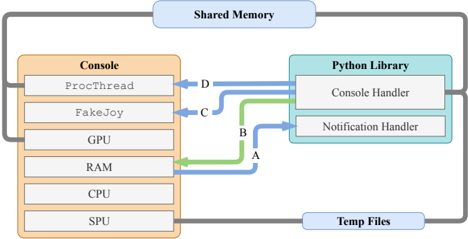
The image depicts a system architecture diagram illustrating the interaction between a "Console" component and a "Python Library" component. Data flow is represented by colored arrows, and the diagram also shows connections to "Shared Memory" and "Temp Files". The diagram appears to be a high-level overview of how the console interacts with a Python library for handling console operations and notifications.
### Components/Axes
The diagram consists of the following components:
* **Console (Peach-colored rectangle):** Contains the following sub-components:
* ProcThread
* FakeJoy
* GPU
* RAM
* CPU
* SPU
* **Python Library (Light Blue rectangle):** Contains the following sub-components:
* Console Handler
* Notification Handler
* **Shared Memory (Light Blue rounded rectangle):** Located at the top of the diagram.
* **Temp Files (Light Blue rounded rectangle):** Located at the bottom of the diagram.
* **Arrows:** Represent data flow, labeled A, B, C, and D. The arrows are colored: Green, Blue, and a combination of Green and Blue.
### Detailed Analysis or Content Details
The diagram shows the following data flow:
* **Arrow A (Green):** Originates from the RAM component within the Console and connects to the Console Handler within the Python Library.
* **Arrow B (Blue):** Originates from the CPU component within the Console and connects to the Notification Handler within the Python Library.
* **Arrow C (Green):** Originates from the FakeJoy component within the Console and connects to the Console Handler within the Python Library.
* **Arrow D (Blue):** Originates from the ProcThread component within the Console and connects to the Console Handler within the Python Library.
Both the Console and the Python Library are connected to "Shared Memory" and "Temp Files" via gray lines, indicating a broader system-level interaction. The connections to Shared Memory and Temp Files are not labeled with specific data flow indicators.
### Key Observations
The diagram highlights a clear separation of concerns between the Console and the Python Library. The Console appears to handle low-level hardware interactions (GPU, RAM, CPU, SPU), while the Python Library provides higher-level handling of console operations and notifications. The use of different colored arrows suggests different types of data or operations being handled by each connection. The Console's components are listed vertically, while the Python Library's components are listed horizontally.
### Interpretation
This diagram likely represents a system where a console application interacts with a Python-based backend for handling console-related tasks. The Console provides the raw input and hardware access, while the Python Library processes this input and manages notifications. The use of Shared Memory and Temp Files suggests that data is being exchanged between the Console and the Python Library outside of the direct connections shown by the colored arrows.
The diagram suggests a modular architecture, where the Console and Python Library can be developed and maintained independently. The specific data flow indicated by the arrows (A, B, C, D) likely represents different types of console events or commands being processed by the Python Library. For example, RAM data might be sent to the Console Handler for rendering, while CPU events might trigger notifications. The "FakeJoy" component suggests the system may be simulating joystick input, sending this data to the Console Handler. The "ProcThread" component likely handles process-related tasks, sending information to the Console Handler.
The diagram does not provide quantitative data or specific details about the data being exchanged, but it offers a valuable overview of the system's architecture and the relationships between its key components.