## Code Comparison: Refinement vs. Repeated Sampling
### Overview
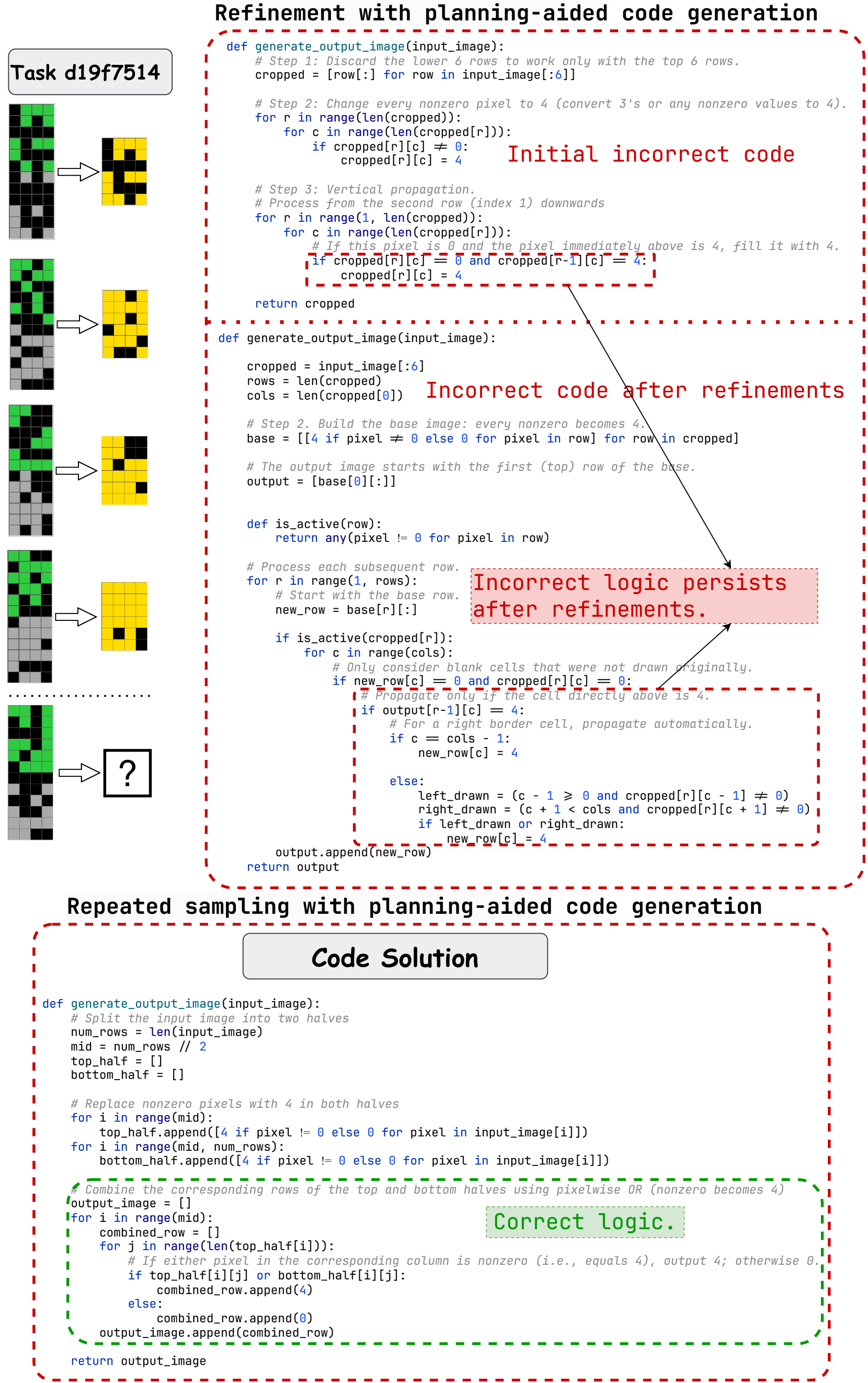
The image presents a comparison between two approaches to code generation: refinement with planning-aided code generation and repeated sampling with planning-aided code generation. It shows the evolution of code through refinement, highlighting incorrect logic at different stages, and contrasts it with a "Code Solution" achieved through repeated sampling. The image includes code snippets, visual representations of image processing steps, and annotations indicating the correctness of the logic.
### Components/Axes
* **Title:** Refinement with planning-aided code generation
* **Title:** Repeated sampling with planning-aided code generation
* **Code Snippets:** Python code for image processing functions.
* **Visual Representations:** Pixelated images representing input and output at different stages.
* **Annotations:** Textual annotations indicating "Initial incorrect code," "Incorrect code after refinements," "Incorrect logic persists after refinements," and "Correct logic."
* **Task Identifier:** "Task d19f7514"
* **Question Mark:** A pixelated image with a question mark, indicating an unknown or desired output.
### Detailed Analysis or ### Content Details
**1. Refinement with planning-aided code generation:**
* **Initial State:** The initial input image is a vertical strip of 12x1 pixels, with alternating green and gray pixels.
* **Step 1:** Discard the lower 6 rows to work only with the top 6 rows.
* `cropped = [row[:] for row in input_image[:6]]`
* **Step 2:** Change every nonzero pixel to 4 (convert 3's or any nonzero values to 4).
* The code iterates through the cropped image and sets any non-zero pixel to 4.
* ```python
for r in range (len (cropped)):
for c in range (len (cropped[r])):
if cropped[r] [c] != 0:
cropped[r] [c] = 4
```
* The resulting image is a 6x1 pixel image with alternating yellow and black pixels.
* **Step 3:** Vertical propagation.
* The code processes from the second row (index 1) downwards.
* If a pixel is 0 and the pixel immediately above is 4, fill it with 4.
* ```python
for r in range (1, len (cropped)):
for c in range(len(cropped[r])):
# If this pixel is 0 and the pixel immediately above is 4, fill it with 4.
if cropped [r] [c] == 0 and cropped [r-1][c] == 4:
cropped[r] [c] = 4
```
* **Incorrect Code Annotations:**
* "Initial incorrect code" points to the first code block.
* "Incorrect code after refinements" points to a code block that crops the input image to the top 6 rows.
* "Incorrect logic persists after refinements" points to a code block that processes each subsequent row.
* **Code Snippets:**
* The code snippets show the evolution of the image processing logic.
* The initial code attempts to change non-zero pixels to 4 and then propagate values vertically.
* The refined code includes steps to build a base image and process subsequent rows.
**2. Repeated sampling with planning-aided code generation:**
* **Code Solution:** The code splits the input image into two halves, replaces non-zero pixels with 4 in both halves, and combines the corresponding rows using pixelwise OR (nonzero becomes 4).
* **Code Snippet:**
* ```python
def generate_output_image(input_image):
# Split the input image into two halves
num_rows = len(input_image)
mid = num_rows // 2
top_half = []
bottom_half = []
# Replace nonzero pixels with 4 in both halves
for i in range(mid):
top_half.append([4 if pixel != 0 else 0 for pixel in input_image[i]])
for i in range(mid, num_rows):
bottom_half.append([4 if pixel != 0 else 0 for pixel in input_image[i]])
#Combine the corresponding rows of the top and bottom halves using pixelwise OR (nonzero becomes 4)
output_image = []
for i in range(mid):
combined_row = []
for j in range(len (top_half[i])):
# If either pixel in the corresponding column is nonzero (i.e., equals 4), output 4; otherwise 0.
if top_half[i][j] or bottom_half[i][j]:
combined_row.append(4)
else:
combined_row.append(0)
output_image.append(combined_row)
return output_image
```
* **Correct Logic Annotation:** "Correct logic" points to the code block that combines the corresponding rows of the top and bottom halves using pixelwise OR.
* **Final State:** The expected output is a 6x1 pixel image with alternating yellow and black pixels.
### Key Observations
* The refinement approach initially contains incorrect logic that is iteratively refined.
* The repeated sampling approach provides a "Code Solution" with correct logic.
* The visual representations show the transformation of the input image at different stages of the refinement process.
* The annotations highlight the correctness or incorrectness of the code logic.
### Interpretation
The image demonstrates the difference between refining an initial, flawed approach and using a repeated sampling method to arrive at a correct solution. The refinement process, while attempting to improve the code, initially contains incorrect logic that persists through multiple iterations. In contrast, the repeated sampling approach yields a "Code Solution" with correct logic, suggesting that a fresh approach can be more effective than iterative refinement in certain cases. The visual representations provide a clear understanding of how the image processing steps transform the input image. The question mark indicates that the desired output is known, and the "Code Solution" achieves this output.