## Line Chart: Accuracy vs. Thinking Compute
### Overview
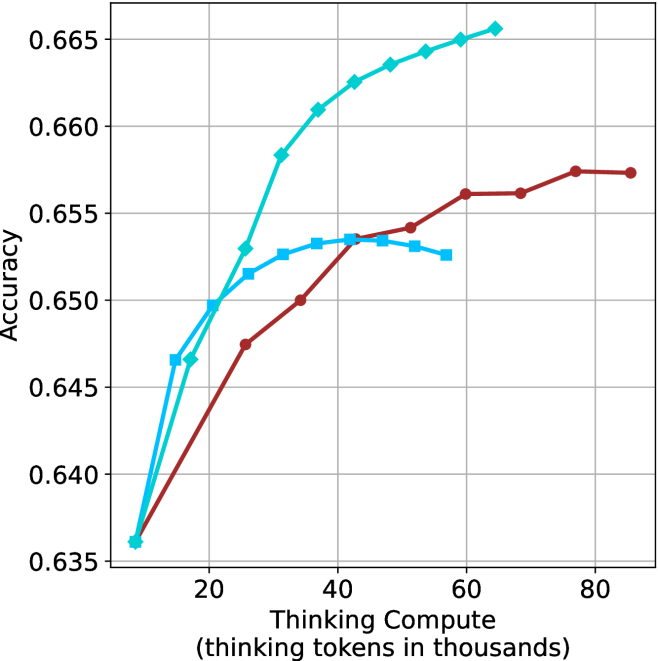
The image is a line chart showing the relationship between "Thinking Compute" (measured in thousands of thinking tokens) and "Accuracy". There are three distinct data series represented by lines of different colors (light blue, blue, and brown), each showing a different trend. The chart has a grid background for easier value estimation.
### Components/Axes
* **X-axis:** "Thinking Compute (thinking tokens in thousands)". The axis ranges from approximately 0 to 80, with tick marks at 20, 40, 60, and 80.
* **Y-axis:** "Accuracy". The axis ranges from 0.635 to 0.665, with tick marks at 0.635, 0.640, 0.645, 0.650, 0.655, 0.660, and 0.665.
* **Data Series:**
* Light Blue Line (with diamond markers): Represents a data series that generally increases with "Thinking Compute", showing a steeper initial increase and then plateauing.
* Blue Line (with square markers): Represents a data series that increases initially, peaks around a "Thinking Compute" value of 40, and then decreases slightly.
* Brown Line (with circle markers): Represents a data series that increases steadily until a "Thinking Compute" value of approximately 60, after which it plateaus.
### Detailed Analysis
* **Light Blue Line (Diamond Markers):**
* At "Thinking Compute" = 10, Accuracy ≈ 0.636
* At "Thinking Compute" = 20, Accuracy ≈ 0.648
* At "Thinking Compute" = 30, Accuracy ≈ 0.658
* At "Thinking Compute" = 40, Accuracy ≈ 0.663
* At "Thinking Compute" = 50, Accuracy ≈ 0.664
* At "Thinking Compute" = 60, Accuracy ≈ 0.665
* At "Thinking Compute" = 70, Accuracy ≈ 0.665
* At "Thinking Compute" = 80, Accuracy ≈ 0.665
* Trend: The light blue line shows a strong positive correlation between "Thinking Compute" and "Accuracy" initially, but the effect diminishes as "Thinking Compute" increases.
* **Blue Line (Square Markers):**
* At "Thinking Compute" = 10, Accuracy ≈ 0.636
* At "Thinking Compute" = 20, Accuracy ≈ 0.652
* At "Thinking Compute" = 30, Accuracy ≈ 0.653
* At "Thinking Compute" = 40, Accuracy ≈ 0.654
* At "Thinking Compute" = 50, Accuracy ≈ 0.653
* At "Thinking Compute" = 60, Accuracy ≈ 0.652
* Trend: The blue line increases initially, peaks around a "Thinking Compute" value of 40, and then decreases slightly.
* **Brown Line (Circle Markers):**
* At "Thinking Compute" = 10, Accuracy ≈ 0.637
* At "Thinking Compute" = 20, Accuracy ≈ 0.647
* At "Thinking Compute" = 30, Accuracy ≈ 0.650
* At "Thinking Compute" = 40, Accuracy ≈ 0.653
* At "Thinking Compute" = 50, Accuracy ≈ 0.654
* At "Thinking Compute" = 60, Accuracy ≈ 0.656
* At "Thinking Compute" = 70, Accuracy ≈ 0.657
* At "Thinking Compute" = 80, Accuracy ≈ 0.657
* Trend: The brown line shows a positive correlation between "Thinking Compute" and "Accuracy" until a "Thinking Compute" value of approximately 60, after which it plateaus.
### Key Observations
* The light blue line consistently achieves the highest accuracy across the range of "Thinking Compute" values.
* The blue line peaks and then declines, suggesting that there may be a point of diminishing returns or overfitting for this particular configuration.
* The brown line plateaus at a lower accuracy level compared to the light blue line.
### Interpretation
The chart suggests that increasing "Thinking Compute" generally improves accuracy, but the extent of improvement varies depending on the specific configuration represented by each line. The light blue line demonstrates the most significant and sustained improvement in accuracy with increasing "Thinking Compute". The blue line's peak and subsequent decline indicate that there might be an optimal level of "Thinking Compute" beyond which performance degrades. The brown line's plateau suggests that further increases in "Thinking Compute" do not lead to significant gains in accuracy for that particular configuration. The data implies that the light blue configuration is the most effective in leveraging "Thinking Compute" to achieve higher accuracy.