\n
## Diagram: Python Module Dependency and Formalization Status
### Overview
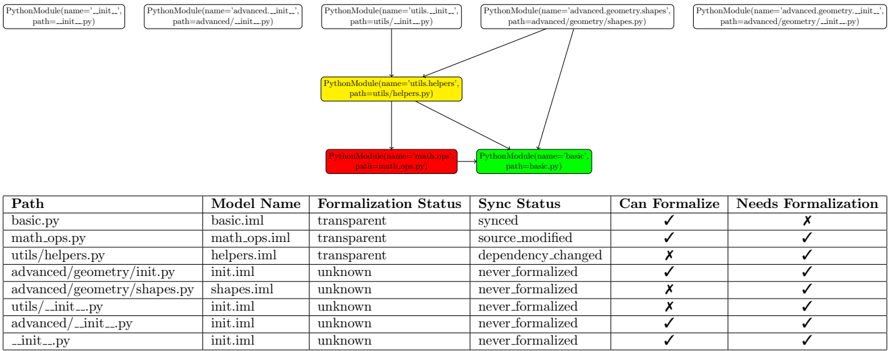
The image presents a diagram illustrating the dependency relationships between Python modules, alongside a table detailing their formalization and synchronization status. The diagram shows a hierarchical structure with modules branching out from a central module. The table provides specific information about each module listed in the diagram.
### Components/Axes
The diagram consists of rectangular nodes representing Python modules, connected by arrows indicating dependencies. Each node displays the module's type ("PythonModule"), name, and path. The table has the following columns: "Path", "Model Name", "Formalization Status", "Sync Status", "Can Formalize", and "Needs Formalization".
### Detailed Analysis or Content Details
**Diagram Analysis:**
* **Top Level Modules (Yellow):** Five yellow modules are positioned across the top of the diagram. They are:
* `PythonModule(name='__init__', path='advanced/__init__.py')`
* `PythonModule(name='advanced', path='advanced/__init__.py')`
* `PythonModule(name='utils', path='utils/__init__.py')`
* `PythonModule(name='advanced_geometry', path='advanced/geometry/shapes.py')`
* `PythonModule(name='advanced_geometry', path='advanced/geometry/__init__.py')`
* **Intermediate Module (Yellow):** A single yellow module is positioned centrally:
* `PythonModule(name='utils.helpers', path='utils/helpers.py')`
* **Bottom Level Modules (Red & Green):** Two modules are positioned at the bottom:
* `PythonModule(name='form.apps', path='form/models.py')` (Red)
* `PythonModule(name='basic', path='basic.py')` (Green)
* **Dependencies:** Arrows originate from the top-level modules and converge on the intermediate module (`utils.helpers`). Arrows then extend from the intermediate module to the bottom-level modules.
**Table Analysis:**
| Path | Model Name | Formalization Status | Sync Status | Can Formalize | Needs Formalization |
| ---------------------- | ------------- | -------------------- | ------------------ | ------------- | ------------------- |
| basic.py | Basic.iml | transparent | synced | X | ✓ |
| math.ops.py | math.ops.iml | transparent | source_modified | ✓ | ✓ |
| utils/helpers.py | helpers.iml | transparent | dependency_changed | X | ✓ |
| advanced/geometry/init.py | init.iml | unknown | never formalized | ✓ | ✓ |
| advanced/geometry/shapes.py | shapes.iml | unknown | never formalized | X | ✓ |
| utils/__init__.py | init.iml | unknown | never formalized | ✓ | ✓ |
| advanced/__init__.py | init.iml | unknown | never formalized | ✓ | ✓ |
| __init__.py | init.iml | unknown | never formalized | ✓ | ✓ |
* **Formalization Status:** The possible values are "transparent", "unknown", and "source_modified".
* **Sync Status:** The possible values are "synced", "source_modified", "dependency_changed", and "never formalized".
* **Can Formalize:** Indicated by a checkmark (✓) or an 'X'.
* **Needs Formalization:** Indicated by a checkmark (✓).
### Key Observations
* Modules `basic.py` and `math.ops.py` have a "transparent" formalization status and are "synced".
* `utils/helpers.py` has a "transparent" formalization status but a "dependency_changed" sync status.
* All modules in the `advanced` directory and `__init__.py` have an "unknown" formalization status and have "never formalized" sync status.
* All modules "Need Formalization".
* `basic.py` and `utils/helpers.py` "Can not Formalize".
### Interpretation
The diagram and table together provide a snapshot of the formalization and synchronization status of a set of Python modules. The diagram visually represents the dependencies between these modules, while the table offers detailed information about each module's status.
The "transparent" formalization status suggests that these modules are already well-defined and can be easily integrated into a formal verification process. The "unknown" status indicates that these modules require further investigation to determine their formal properties. The "source_modified" and "dependency_changed" sync statuses suggest that these modules have been updated and may require re-synchronization or re-formalization.
The fact that all modules "Need Formalization" suggests a project-wide effort to improve the reliability and correctness of the codebase through formal methods. The modules that "Can not Formalize" may require significant refactoring or redesign to become amenable to formal verification.
The diagram's hierarchical structure highlights the importance of the `utils.helpers` module, as it serves as a central dependency for several other modules. This suggests that ensuring the formalization and synchronization of this module is crucial for the overall health of the project.