## Image Processing Task: Digit Recognition and Matrix Generation
### Overview
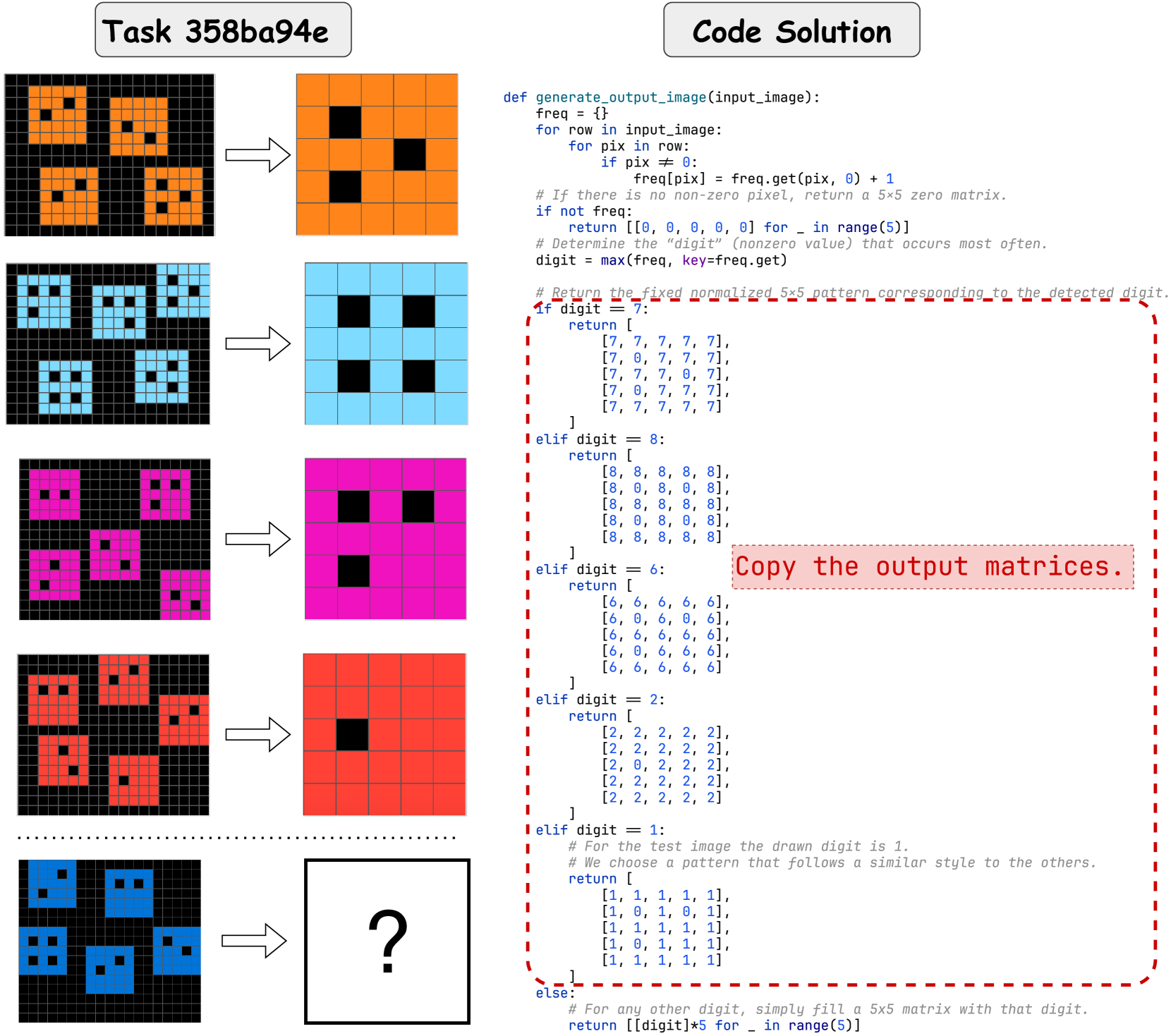
The image presents a task involving digit recognition from pixelated images and the generation of corresponding 5x5 matrices based on the identified digit. The left side shows input images, each composed of multiple instances of a digit represented by colored pixels on a black background. An arrow points from each input image to a corresponding output image, where the digit is represented by a single color on a grid. The right side provides a Python code solution that defines a function to generate the output matrices. The final input image has a question mark, indicating the task is to determine the output image.
### Components/Axes
* **Task Title:** "Task 358ba94e" (top-left)
* **Code Title:** "Code Solution" (top-right)
* **Input Images:** A series of pixelated images on the left, each containing multiple instances of a digit. The digits are represented by different colors (orange, light blue, magenta, red, dark blue).
* **Output Images:** A series of colored square grids on the right, each representing a digit. The color of the grid corresponds to the color of the digit in the input image.
* **Arrow:** An arrow connects each input image to its corresponding output image.
* **Code:** Python code defining a function `generate_output_image(input_image)` that takes an input image and returns a 5x5 matrix representing the detected digit.
* **Question Mark:** A question mark in a square grid, indicating the task is to determine the output image for the last input image.
* **Red dashed box:** A red dashed box surrounds the code block. The text "Copy the output matrices." is inside the box.
### Detailed Analysis
**Input Images and Corresponding Output Images:**
1. **Orange Digits:** The first input image contains four orange digits. The corresponding output image is an orange grid with a single black pixel in the center.
2. **Light Blue Digits:** The second input image contains four light blue digits. The corresponding output image is a light blue grid with a single black pixel in the center.
3. **Magenta Digits:** The third input image contains four magenta digits. The corresponding output image is a magenta grid with a single black pixel in the center.
4. **Red Digits:** The fourth input image contains four red digits. The corresponding output image is a red grid with a single black pixel in the center.
5. **Dark Blue Digits:** The fifth input image contains four dark blue digits. The corresponding output image is unknown, indicated by a question mark.
**Code Analysis:**
The Python code defines a function `generate_output_image(input_image)` that performs the following steps:
1. **Frequency Calculation:** Calculates the frequency of each pixel value in the input image.
2. **Zero Pixel Check:** If there are no non-zero pixels, it returns a 5x5 matrix filled with zeros.
3. **Digit Determination:** Determines the "digit" by finding the non-zero pixel value that occurs most often.
4. **Matrix Generation:** Returns a fixed normalized 5x5 pattern corresponding to the detected digit. The code provides specific patterns for digits 7, 8, 6, 2, and 1. For any other digit, it simply fills a 5x5 matrix with that digit.
**Specific Matrix Patterns:**
* **Digit 7:**