## Diagram: Robot Navigation System Architecture
### Overview
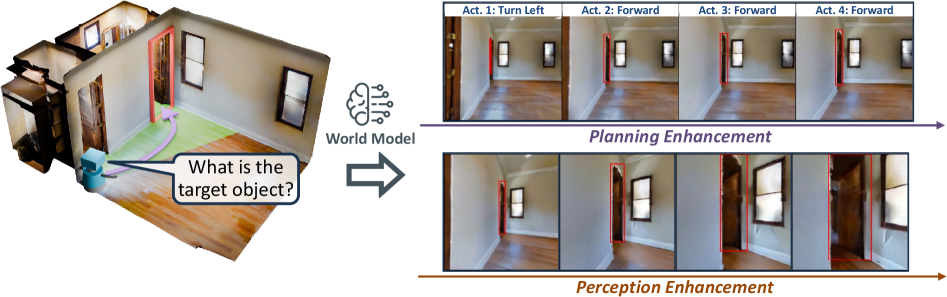
The image depicts a technical diagram illustrating a robot navigation system's workflow. It combines a 3D spatial model with sequential action planning and perception enhancement processes. The system appears to integrate world modeling, action planning, and sensory feedback loops for autonomous navigation.
### Components/Axes
1. **Left Panel**:
- **3D Room Model**: A rendered interior space with:
- Wooden flooring
- Two windows (left and right walls)
- Two doors (red and brown)
- A blue robot positioned near the center
- **Speech Bubble**: Contains the text *"What is the target object?"*
- **Brain Icon**: Labeled *"World Model"* with radiating lines
2. **Right Panel**:
- **Top Section**:
- **Title**: *"Planning Enhancement"*
- **Four Action Sequences**:
- *Act 1: Turn Left*
- *Act 2: Forward*
- *Act 3: Forward*
- *Act 4: Forward*
- Each action shows the robot's position relative to red bounding boxes (likely representing target objects or obstacles)
- **Bottom Section**:
- **Title**: *"Perception Enhancement"*
- **Four Action Sequences**:
- *Act 1: Turn Left*
- *Act 2: Forward*
- *Act 3: Forward*
- *Act 4: Forward*
- Visuals include enhanced details (e.g., door textures, window reflections) compared to the planning phase
3. **Arrows**:
- A purple arrow connects the 3D model to the *"World Model"* brain icon
- A blue arrow links the brain icon to the *"Planning Enhancement"* section
- A brown arrow connects *"Planning Enhancement"* to *"Perception Enhancement"*
### Detailed Analysis
- **Action Sequences**:
- All actions follow a consistent pattern: initial left turn followed by three forward movements.
- Red bounding boxes in both sections highlight target objects or critical spatial features (e.g., doors, windows).
- Perception-enhanced images show more detailed environmental textures (e.g., door handles, floor patterns).
- **Spatial Relationships**:
- The robot's position shifts progressively across action sequences, indicating movement through the space.
- The red bounding boxes remain static in the planning phase but align more precisely with environmental features in the perception phase.
### Key Observations
1. The system prioritizes **planning** (high-level pathfinding) before **perception** (detailed sensory input).
2. The red bounding boxes suggest the robot uses object detection to identify targets during navigation.
3. Enhanced perception improves spatial awareness, as seen in the detailed door/window renderings.
### Interpretation
This diagram demonstrates a hierarchical navigation framework where:
- **World Model**: Represents the robot's internal understanding of its environment.
- **Planning Enhancement**: Translates high-level goals (e.g., "reach the target object") into actionable steps.
- **Perception Enhancement**: Refines these actions using real-time sensory data to adapt to dynamic environments.
The workflow implies a closed-loop system where perception feedback continuously updates the world model, enabling robust navigation in complex spaces. The consistent action sequence (*Turn Left → Forward*) suggests a predefined path, while the enhanced perception layer allows for adjustments based on environmental details (e.g., avoiding obstacles, aligning with doorframes).
**Note**: No numerical data or quantitative values are present in the image. The analysis is based on textual labels, spatial relationships, and visual cues.