\n
## Diagram: AI Correction Mechanisms for Hallucination and Invalid Actions
### Overview
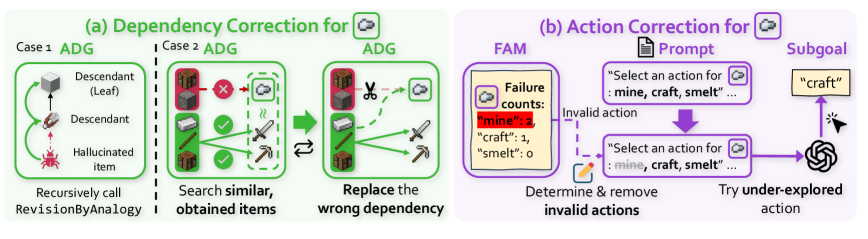
The image is a technical diagram illustrating two distinct correction mechanisms for an AI agent, likely operating in a simulated environment (e.g., Minecraft). The left side (a) details a process for correcting erroneous item dependencies in the agent's knowledge graph. The right side (b) details a process for correcting invalid action selection. The diagram uses a combination of flowchart elements, icons, and text to explain these processes.
### Components/Axes
The diagram is divided into two primary, color-coded sections:
1. **Section (a) - Dependency Correction (Green Theme):** Located on the left half. It is subdivided into "Case 1" and "Case 2," each showing an "ADG" (likely Action Dependency Graph).
2. **Section (b) - Action Correction (Purple Theme):** Located on the right half. It shows a flow involving a "FAM" (Failure Action Memory), a "Prompt," and a "Subgoal."
**Key Textual Elements and Labels:**
* **Main Titles:** "(a) Dependency Correction for [Cloud Icon]" and "(b) Action Correction for [Cloud Icon]".
* **Section (a) Labels:** "Case 1 ADG", "Case 2 ADG", "Descendant (Leaf)", "Descendant", "Hallucinated item", "Recursively call RevisionByAnalogy", "Search similar, obtained items", "Replace the wrong dependency".
* **Section (b) Labels:** "FAM", "Failure counts:", "Prompt", "Subgoal", "Invalid action", "Determine & remove invalid actions", "Try under-explored action".
* **Embedded Text in Boxes:**
* In the FAM box: `"mine": 3`, `"craft": 1`, `"smelt": 0`.
* In the Prompt box: `"Select an action for : mine, craft, smelt ..."` (appears twice).
* The Subgoal box contains the word: `"craft"`.
### Detailed Analysis
**Section (a): Dependency Correction**
* **Case 1 ADG (Top-Left):** Shows a simple vertical dependency chain. From top to bottom: an icon of a crafting table labeled "Descendant (Leaf)", connected by a downward arrow to an icon of a pickaxe labeled "Descendant", which is connected by a downward arrow to a red, spiky icon labeled "Hallucinated item". The instruction below reads: "Recursively call RevisionByAnalogy".
* **Case 2 ADG (Center-Left):** Shows a more complex graph. A redstone ore block (top) has a red "X" over its connection to a cloud icon. Below it, an iron ore block has green checkmarks on its connections to an iron ingot and an iron pickaxe. A dashed box encloses the iron ingot and pickaxe, with a wavy line suggesting a search or similarity function. The instruction below reads: "Search similar, obtained items".
* **Correction Process (Center):** A large green arrow points from the Case 2 ADG to a corrected ADG. In the corrected graph, the connection from the redstone ore to the cloud is severed by a scissors icon. A new, solid green arrow connects the iron ore to the cloud. The instruction below reads: "Replace the wrong dependency".
**Section (b): Action Correction**
* **Flow Direction:** The process flows from left to right.
* **FAM (Failure Action Memory) Box (Left):** Contains a cloud icon and the text "Failure counts:" followed by a list: `"mine": 3`, `"craft": 1`, `"smelt": 0`. A dashed purple arrow labeled "Invalid action" points from this box to the next step.
* **Determination Step (Center-Bottom):** An icon of a pencil and eraser is shown with the text "Determine & remove invalid actions".
* **Prompt Box (Center-Top):** A purple box containing the text: `"Select an action for : mine, craft, smelt ..."`. A thick purple arrow points downward from this box.
* **Action Selection & Subgoal (Right):** The downward arrow leads to a second, identical Prompt box. From this box, a purple arrow points right to a yellow box labeled "Subgoal" containing the word `"craft"`. A final arrow points from the Subgoal to a swirling icon (representing the AI agent or policy), with the label "Try under-explored action".
### Key Observations
1. **Two-Pronged Approach:** The system addresses errors at two levels: the foundational knowledge graph (dependencies between items) and the runtime decision-making (action selection).
2. **Use of Memory:** The Action Correction mechanism explicitly uses a "Failure Action Memory" (FAM) to track and avoid previously failed actions (`"mine"` has failed 3 times).
3. **Analogical Reasoning:** The Dependency Correction for "Case 1" relies on "RevisionByAnalogy," suggesting it uses similar, known correct structures to fix hallucinated or incorrect dependencies.
4. **Exploration Bias:** The final step in Action Correction is to "Try under-explored action," indicating a strategy to overcome repetitive failure by encouraging exploration of less-tried options within the valid action space.
5. **Visual Coding:** Green is consistently used for dependency-related processes and successful corrections. Purple is used for action-selection processes and failure memory.
### Interpretation
This diagram outlines a sophisticated self-correction framework for an AI agent. The **Dependency Correction** process is a form of knowledge graph repair. It identifies "hallucinated" items—concepts the agent incorrectly believes are necessary—and either finds analogies to correct the graph (Case 1) or replaces the faulty dependency with a link to an item the agent has actually obtained and used successfully (Case 2). This ensures the agent's internal model of the world is grounded in its experiences.
The **Action Correction** process is a behavioral adaptation loop. By maintaining a memory of failed actions (FAM), the agent can dynamically filter its available action space (`mine, craft, smelt`). When prompted to select an action, it removes the invalid ones (e.g., it might stop trying to "mine" if it has failed repeatedly) and instead selects from the remaining valid actions, prioritizing those it has explored less. This prevents the agent from being stuck in a loop of repeating the same mistakes.
Together, these mechanisms allow the agent to recover from both **conceptual errors** (wrong beliefs about how the world works) and **procedural errors** (repeating failed actions), making its behavior more robust and adaptive. The cloud icon in both titles suggests these corrections are triggered by or related to some form of external feedback or a failure signal (a "cloud" of uncertainty or error).