## Diagram: Reinforcement Learning Architectures
### Overview
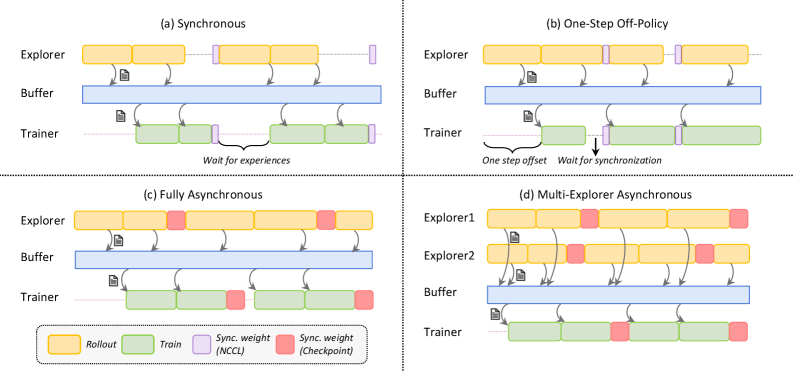
The image presents four diagrams illustrating different reinforcement learning architectures: Synchronous, One-Step Off-Policy, Fully Asynchronous, and Multi-Explorer Asynchronous. Each diagram depicts the interaction between an Explorer (or Explorers), a Buffer, and a Trainer, showing the flow of data and synchronization points.
### Components/Axes
Each of the four sub-diagrams contains the following components:
* **Explorer (or Explorers):** Represents the agent(s) interacting with the environment, generating experiences (rollouts).
* **Buffer:** A storage area for experiences collected by the explorer(s).
* **Trainer:** The component responsible for learning from the experiences stored in the buffer.
* **Rollout:** Represented by yellow rectangles, indicating the generation of experiences by the explorer.
* **Train:** Represented by green rectangles, indicating the training process performed by the trainer.
* **Sync. weight (NCCL):** Represented by light purple rectangles, indicating synchronization points using NCCL.
* **Sync. weight (Checkpoint):** Represented by red rectangles, indicating synchronization points using Checkpoints.
* **Arrows:** Indicate the flow of data (experiences) from the explorer(s) to the buffer and from the buffer to the trainer.
### Detailed Analysis
**(a) Synchronous**
* **Explorer:** Generates rollouts (yellow rectangles) and sends experiences to the buffer.
* **Buffer:** Stores the experiences.
* **Trainer:** Trains on the experiences from the buffer (green rectangles).
* **Synchronization:** The trainer waits for experiences from the explorer before training. Synchronization points (light purple rectangles) are present between rollouts and training.
* **Text:** "Wait for experiences"
**(b) One-Step Off-Policy**
* **Explorer:** Generates rollouts (yellow rectangles) and sends experiences to the buffer.
* **Buffer:** Stores the experiences.
* **Trainer:** Trains on the experiences from the buffer (green rectangles).
* **Synchronization:** The trainer waits for synchronization. There is a "one step offset" between the explorer and trainer. Synchronization points (light purple rectangles) are present between rollouts and training.
* **Text:** "One step offset", "Wait for synchronization"
**(c) Fully Asynchronous**
* **Explorer:** Generates rollouts (yellow rectangles) and sends experiences to the buffer.
* **Buffer:** Stores the experiences.
* **Trainer:** Trains on the experiences from the buffer (green rectangles).
* **Synchronization:** Synchronization points (red rectangles) are present between rollouts and training.
**(d) Multi-Explorer Asynchronous**
* **Explorer1 & Explorer2:** Two explorers generate rollouts (yellow rectangles) and send experiences to the buffer.
* **Buffer:** Stores the experiences.
* **Trainer:** Trains on the experiences from the buffer (green rectangles).
* **Synchronization:** Synchronization points (red rectangles) are present between rollouts and training.
### Key Observations
* The diagrams illustrate different approaches to synchronizing the explorer(s) and trainer in reinforcement learning.
* Synchronous methods involve waiting for experiences or synchronization points, while asynchronous methods allow for more independent operation.
* The Multi-Explorer Asynchronous architecture utilizes multiple explorers to generate experiences concurrently.
### Interpretation
The diagrams highlight the trade-offs between different reinforcement learning architectures. Synchronous methods may offer more stable learning but can be slower due to waiting times. Asynchronous methods can be faster but may introduce instability due to the lack of synchronization. The choice of architecture depends on the specific application and the desired balance between speed and stability. The use of multiple explorers in the Multi-Explorer Asynchronous architecture can potentially accelerate learning by increasing the diversity of experiences.