## [Screenshot]: Machine Learning Training Portal Configuration Interface
### Overview
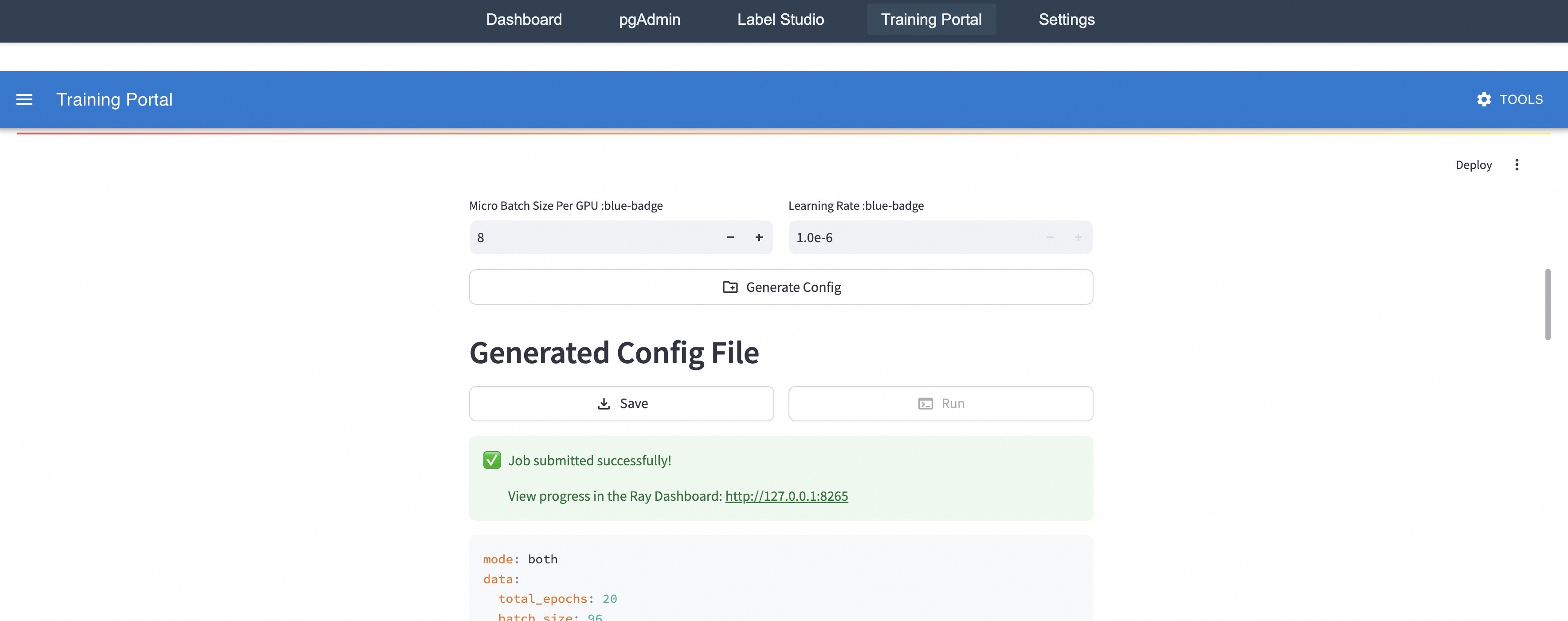
This image is a screenshot of a web-based user interface for a "Training Portal," likely part of a machine learning operations (MLOps) or model training platform. The interface allows users to configure training hyperparameters, generate a configuration file, and submit a training job. A success message indicates a job has been submitted, and a partial view of the generated configuration file is visible.
### Components/Axes
The interface is structured into distinct horizontal sections:
1. **Top Navigation Bar (Dark Grey):**
* Contains five navigation links/tabs: `Dashboard`, `pgAdmin`, `Label Studio`, `Training Portal` (currently active, indicated by a subtle background highlight), and `Settings`.
2. **Application Header (Blue):**
* Left side: A hamburger menu icon (three horizontal lines) followed by the title `Training Portal`.
* Right side: A gear icon labeled `TOOLS`.
3. **Main Content Area (White Background):**
* **Hyperparameter Input Section:**
* Two labeled input fields arranged side-by-side.
* Left Field: Label is `Micro Batch Size Per GPU :blue-badge`. The input box contains the value `8` and has decrement (`-`) and increment (`+`) buttons.
* Right Field: Label is `Learning Rate :blue-badge`. The input box contains the value `1.0e-6` and has decrement (`-`) and increment (`+`) buttons.
* Below these fields is a wide button labeled `Generate Config` with a document-plus icon.
* **Generated Config Section:**
* A large heading: `Generated Config File`.
* Two action buttons below the heading: `Save` (with a download icon) and `Run` (with a play/terminal icon).
* **Status Message Box (Light Green):**
* Contains a green checkmark icon and the text: `Job submitted successfully!`.
* Below that: `View progress in the Ray Dashboard: http://127.0.0.1:8265` (the URL is a hyperlink).
* **Configuration File Preview (Light Grey Code Block):**
* Displays the beginning of a YAML-formatted configuration file. The visible lines are:
* `mode: both`
* `data:`
* ` total_epochs: 20`
* ` batch_size: 96` (The line is partially cut off at the bottom of the image).
4. **Other UI Elements:**
* A `Deploy` button with a vertical ellipsis (⋮) menu icon is visible in the upper right corner of the main content area.
* A vertical scrollbar is present on the far right edge, indicating more content exists below the visible area.
### Detailed Analysis
* **Hyperparameters:** The user has set a micro batch size of 8 per GPU and a learning rate of 1.0e-6 (0.000001).
* **Job Status:** The green notification confirms a training job was successfully submitted to a system called "Ray" (a distributed computing framework). Progress can be monitored at the local address `http://127.0.0.1:8265`.
* **Configuration File:** The generated YAML config specifies:
* `mode: both` - This likely indicates the job will perform both training and evaluation, or use both data sources.
* `data:` section - Defines dataset parameters.
* `total_epochs: 20` - The model will be trained for 20 full passes through the dataset.
* `batch_size: 96` - The global batch size for training is 96. Given the "Micro Batch Size Per GPU" is 8, this implies the job is configured to run on 12 GPUs (96 / 8 = 12).
### Key Observations
1. **Integrated Workflow:** The portal integrates several tools (pgAdmin for databases, Label Studio for data annotation) suggesting an end-to-end ML pipeline.
2. **Local Development/Testing:** The use of `127.0.0.1` (localhost) in the Ray Dashboard link indicates this is likely a local development or testing environment, not a production cluster.
3. **State Indication:** The `Run` button appears greyed out or inactive, which is consistent with the job having already been submitted successfully.
4. **Partial Information:** The configuration file is truncated. Critical parameters like the model architecture, dataset path, or optimizer settings are not visible in this screenshot.
### Interpretation
This interface represents a **training job submission portal** within an MLOps platform. Its primary function is to abstract the complexity of writing training scripts and cluster configuration files into a simple web form.
* **Process Flow:** The user flow is: 1) Set key hyperparameters (batch size, learning rate), 2) Click "Generate Config" to create a YAML file, 3) Click "Run" to submit the job to a Ray cluster. The system provides immediate feedback on submission success and a direct link to a monitoring dashboard.
* **Underlying System:** The mention of "Ray Dashboard" is a key indicator. Ray is an open-source framework for scaling Python applications. This portal is a custom UI built on top of Ray's job submission API, simplifying the process for data scientists or ML engineers.
* **Purpose of "blue-badge":** The `:blue-badge` text next to the hyperparameter labels is likely a UI placeholder or a tag indicating these are configurable "blue" (perhaps meaning "adjustable" or "important") parameters. It is not standard text and may be rendered as a visual badge in the live interface.
* **Missing Context:** The screenshot captures the moment after job submission. To fully understand the system, one would need to see the full configuration file, the Ray Dashboard interface, and the preceding steps where the model and dataset are defined. The `mode: both` setting is particularly ambiguous without additional documentation.