## Technical Content Display: Error Message Analysis
### Overview
This image displays a technical document or presentation slide titled "3. Error Message". It is composed of two main sections: a left panel detailing an error scenario with input, program output, and expected output, and a right panel providing an explanation and a tip related to the error message. The overall purpose is to illustrate a program failure by showing the test case that caused it.
### Components/Axes
The image does not contain traditional axes or legends as it is not a chart or graph. Instead, it presents structured textual information.
**Header (Top-Left):**
* "3. Error Message"
**Left Panel (Main Content Block - Centered-Left):**
This panel is a white rectangular box with a light grey border, containing several sections of text.
* **Title (Top of panel):** "Error" (bold)
* **Instruction/Tip (Below "Error", italicized):** "Tip: If you're executing the code on your machine, copy-paste the input into a file and pipe it to the program with 'python3 program.py < input.txt'"
* **Section Header (Below tip):** "Input" (bold)
* **Section Header (Below input list):** "Program Output" (bold)
* **Section Header (Below program output):** "Expected Output" (bold)
**Right Panel (Explanatory Text - Centered-Right):**
This panel contains explanatory text and bullet points.
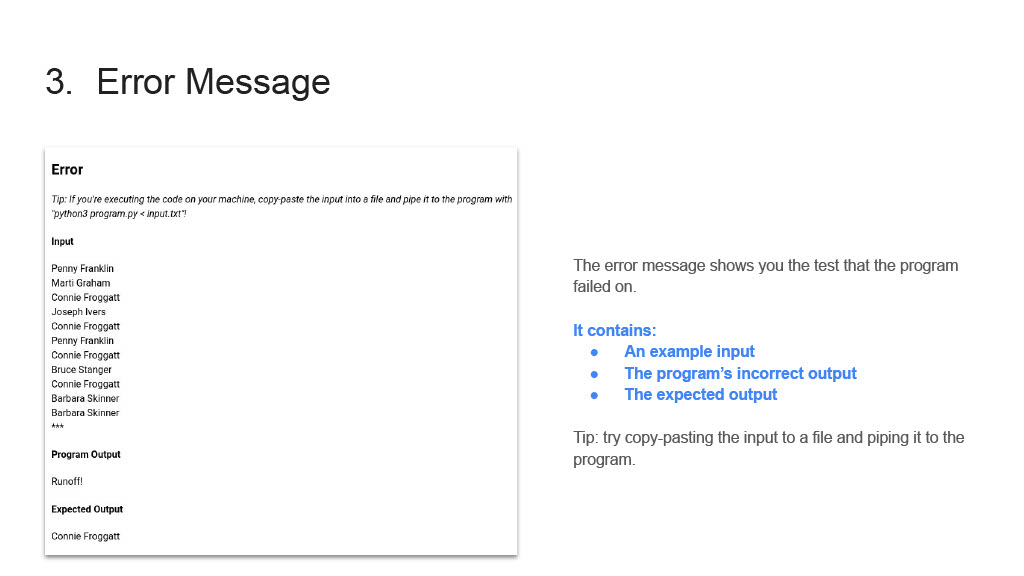
* **Main Text:** "The error message shows you the test that the program failed on."
* **Sub-header:** "It contains:"
* **Bullet Points (Blue text):**
* "An example input"
* "The program's incorrect output"
* "The expected output"
* **Tip (Below bullet points):** "Tip: try copy-pasting the input to a file and piping it to the program."
### Detailed Analysis
**Left Panel Content:**
* **Error Tip:** The tip provides a command-line instruction for reproducing the error: `python3 program.py < input.txt`. This implies the program `program.py` takes input from a file named `input.txt`.
* **Input Data:** This section lists eleven names followed by three asterisks, suggesting the end of the input or a truncation.
* Penny Franklin
* Marti Graham
* Connie Froggatt
* Joseph Ivers
* Connie Froggatt
* Penny Franklin
* Connie Froggatt
* Bruce Stanger
* Connie Froggatt
* Barbara Skinner
* Barbara Skinner
* ***
* **Program Output Data:** The program, when run with the provided input, produced the following output:
* "Runoff!"
* **Expected Output Data:** The desired or correct output for the given input was:
* "Connie Froggatt"
**Right Panel Content:**
* The text "The error message shows you the test that the program failed on." clarifies the purpose of the left panel's content.
* The bullet points explicitly state what information is presented in the error message, with the text in blue ("An example input", "The program's incorrect output", "The expected output") directly corresponding to the "Input", "Program Output", and "Expected Output" sections in the left panel.
* The second tip, "Tip: try copy-pasting the input to a file and piping it to the program.", reiterates the method for reproducing the error, reinforcing the instruction given in the left panel.
### Key Observations
* The image clearly presents a debugging scenario, contrasting actual program output with expected output.
* The discrepancy between "Runoff!" (Program Output) and "Connie Froggatt" (Expected Output) is the core of the error being demonstrated.
* The input data consists of a list of names, suggesting the program might be processing or filtering names.
* The instructions for reproducing the error are provided twice, emphasizing the practical aspect of debugging.
* The use of blue text for the bullet points on the right visually links the explanation to the specific components of the error message.
### Interpretation
This document serves as an example of how to present a program error for analysis or debugging. It effectively isolates the problem by providing all necessary context: the exact input that triggered the failure, the incorrect result produced by the program, and the correct result that was anticipated.
The program `program.py` likely processes a list of names. Given the "Expected Output" is "Connie Froggatt" and the "Program Output" is "Runoff!", it suggests a significant logical error. Perhaps the program is intended to identify a specific name based on some criteria (e.g., the last name alphabetically, the most frequent name, or a name associated with a specific condition), but instead, it's outputting a generic or incorrect string "Runoff!". The presence of "Connie Froggatt" multiple times in the input list (4 times) might be a clue, suggesting the program might be intended to count occurrences, identify a majority, or perform some aggregation related to names.
The repeated "Tip" about piping input from a file indicates that this document is likely part of a tutorial or assignment where users are expected to run and debug code themselves. It guides the user on how to replicate the exact conditions under which the error occurred, which is a fundamental step in debugging. The structure of the error message (Input, Program Output, Expected Output) is a standard and effective way to communicate test failures in software development.